
Bayville, NY · Nassau County
Architectural Review Application
Bayville property owners or authorized applicants use this application to request architectural review for new enclosed structures or qualifying improvements, reconstruction, or renovations.
- licensed online notary
- ~15 min average
- Notarized PDF emailed
What you’ll need
- Government-issued photo ID
- Webcam-enabled device (laptop or phone)
- This form, ready to upload as a PDF
What this form is
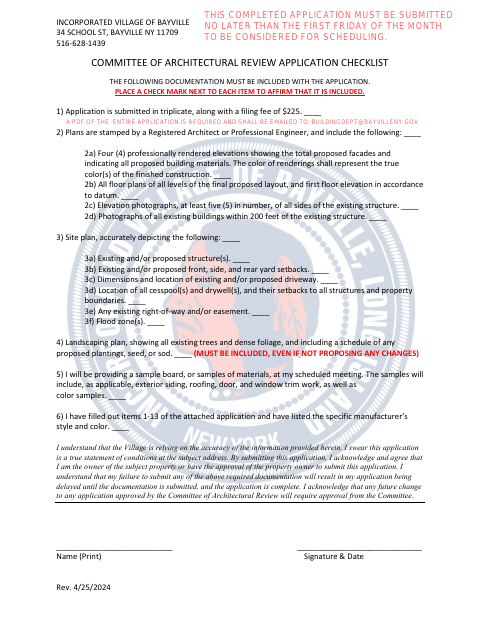
Bayville requires architectural approval for new enclosed structures and for certain improvements, reconstruction, or renovations. The application asks for property and project details and must be submitted with plans, photographs, a site plan, landscaping information, and other required documents in triplicate. The instructions say the application must be properly signed and notarized; incomplete submissions may be delayed. The Building Inspector reviews the materials before the application is forwarded to the Committee of Architectural Review.
Who needs it
A property owner or an applicant approved by the owner needs this form when seeking Bayville architectural review for a new enclosed structure or qualifying project.
Why it needs a notary
The form requires notarization but provides no labeled jurat or acknowledgment block; the applicant signs the sworn statement that the application is true before a commissioned online notary.
How to get this notarized
- 1
Download The Application
Get the current Architectural Review Application and checklist from the Village of Bayville.
- 2
Complete The Form
Answer all applicable questions and assemble the plans, photographs, site plan, landscaping information, and other required documents.
- 3
Book An Online Notary
Schedule a remote session with a commissioned online notary for the application’s sworn statement.
- 4
Sign During The Video Session
Follow the notary’s instructions and sign the sworn statement during the online session.
- 5
Submit To The Village
Submit the notarized application and required documents in triplicate, along with the filing fee, following the Village’s instructions.
Preview the form
The blank PDF straight from Bayville. Look it over, then upload your filled copy to start the notary session.

You’ll need ID and a webcam.
A licensed online notary will join you on video, verify your government-issued ID, witness your signature, and apply their seal. You’ll receive the notarized PDF by email when the session ends.
Frequently asked questions
- How do I notarize the Bayville architectural review application online?
- Complete the application, then book a session with a commissioned online notary. Sign the sworn statement during the video session and follow the notary’s instructions for completing the notarization.
- Do I need to sign this application in front of a notary?
- Yes. The instructions say the application must be properly signed and notarized, and the checklist includes a sworn statement signed by the applicant.
- What documents must accompany the application?
- The checklist calls for plans, elevations, photographs, a site plan, a landscaping plan, and other supporting materials. Submit the application and required documents in triplicate, with the stated filing fee.
- Can I use a remote online notary for this form?
- New York authorizes remote online notarization for its own notaries under Executive Law §135-c, effective in 2023. Confirm with the city, town or village if unsure whether it will accept a remotely notarized application.