
Oyster Bay, NY · Nassau County
Applicant’s Disclosure Affidavit
The Applicant’s Disclosure Affidavit records an applicant’s sworn statements about a property, ownership interests, encumbrances, and potential relationships for a Town of Oyster Bay application filing.
- licensed online notary
- ~15 min average
- Notarized PDF emailed
What you’ll need
- Government-issued photo ID
- Webcam-enabled device (laptop or phone)
- This form, ready to upload as a PDF
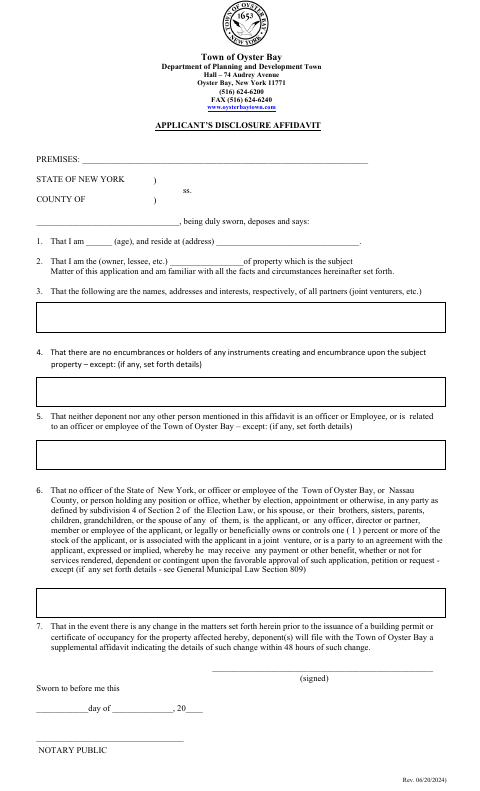
What this form is
This affidavit records the applicant’s age, residence, relationship to the property, and the names and interests of partners or joint venturers. It also asks about encumbrances and specified relationships involving public officials, and requires a supplemental affidavit if information changes before a building permit or certificate of occupancy is issued. The form is for a property that is the subject of an application to the Town of Oyster Bay Department of Planning and Development.
Who needs it
Applicants for property that is the subject of a Town of Oyster Bay application use this affidavit to disclose ownership and related information.
Why it needs a notary
The form has a sworn statement and a “Sworn to before me” notary block; the applicant named as deponent signs and swears before the notary.
How to get this notarized
- 1
Download The Affidavit
Get the Applicant’s Disclosure Affidavit from the Town of Oyster Bay.
- 2
Fill In The Form
Enter the premises and applicant details, then complete the disclosure statements and exceptions.
- 3
Book An Online Notary
Schedule a remote session with Rush Notary before signing.
- 4
Sign On Video
Join the online session and swear to the affidavit before the notary.
- 5
Submit To The Town
Send the completed affidavit to the Town of Oyster Bay with your application.
Preview the form
The blank PDF straight from Oyster Bay. Look it over, then upload your filled copy to start the notary session.

You’ll need ID and a webcam.
A licensed online notary will join you on video, verify your government-issued ID, witness your signature, and apply their seal. You’ll receive the notarized PDF by email when the session ends.
Frequently asked questions
- How do I complete the Applicant’s Disclosure Affidavit?
- Fill in the premises and applicant details, answer the disclosure items, and sign and swear before a notary. Submit the completed affidavit to the Town of Oyster Bay with your application.
- Do I need to sign this affidavit before a notary?
- Yes. The form includes a sworn statement and a “Sworn to before me” block, so the applicant signing as deponent must swear before a notary.
- Can I use a commissioned online notary?
- New York authorizes remote online notarization by its commissioned online notaries under Executive Law §135-c. Arrange the online session before signing the affidavit.
- What if information on the affidavit changes?
- The form says to file a supplemental affidavit with the Town within 48 hours of a change occurring before the building permit or certificate of occupancy is issued. Confirm with the city, town or village if unsure.
Other forms in Oyster Bay
Affidavit of Average Setback
Oyster Bay
Change of Contractor, Plumber, Electrician or Other Professional
Oyster Bay
Contractor, Plumber, Electrician Submission Form
Oyster Bay
Corporate Disclosure Affidavit
Oyster Bay
Final Affidavit of Certification
Oyster Bay
Preliminary Affidavit of Footings, Foundations and Existing Support Systems
Oyster Bay