
Babylon, NY · Suffolk County
Notice of Claim Form
This form presents a claim against the Town of Babylon and is filed with the Town Clerk by an individual claimant or a corporate claimant through an officer.
- licensed online notary
- ~15 min average
- Notarized PDF emailed
What you’ll need
- Government-issued photo ID
- Webcam-enabled device (laptop or phone)
- This form, ready to upload as a PDF
What this form is
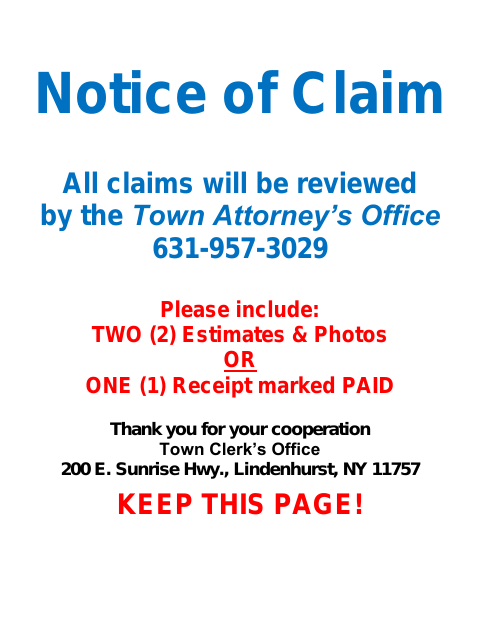
The Notice of Claim form records who is making a claim against the Town, the nature of the claim, when and where it arose, and the injuries or property damage claimed. The Town’s instructions request two estimates and photos, or one receipt marked paid. The form includes separate verification sections for individuals and corporate claimants. Complete the applicable section and submit the claim to the Town Clerk at the address shown on the form.
Who needs it
A person or corporation presenting a claim against the Town of Babylon uses this form, with a corporate claimant’s officer completing the corporate verification.
Why it needs a notary
The form has a sworn verification and jurat; the individual claimant or corporate officer completing the applicable verification signs and swears before the notary.
How to get this notarized
- 1
Download the Form
Get the Notice of Claim form from the Town of Babylon and review its instructions and supporting-document request.
- 2
Complete the Applicable Sections
Enter the claim details and complete the individual or corporate verification that applies. Do not sign the verification before your notary session.
- 3
Book an Online Notary
Schedule a remote session with a commissioned online notary and prepare valid identification.
- 4
Sign on Video
Join the video session, sign the applicable verification, and swear to its contents before the notary.
- 5
Submit to the Town
Send the completed form and requested estimates and photos, or paid receipt, to the Town Clerk as directed.
Preview the form
The blank PDF straight from Babylon. Look it over, then upload your filled copy to start the notary session.

You’ll need ID and a webcam.
A licensed online notary will join you on video, verify your government-issued ID, witness your signature, and apply their seal. You’ll receive the notarized PDF by email when the session ends.
Frequently asked questions
- How do I notarize the Notice of Claim online?
- Complete the relevant verification but wait to sign. Book a remote session with a commissioned online notary, show identification, and sign and swear to the verification during the video session.
- Do I need to include estimates or receipts?
- The form asks claimants to include two estimates and photos, or one receipt marked paid. Check that your supporting materials match the Town’s instructions before submitting.
- Can I use a commissioned online notary for this form?
- New York authorizes remote online notarization by its notaries under Executive Law §135-c, in effect since 2023. Confirm with the city, town or village if unsure about the receiving office’s requirements.
- Where do I submit the completed form?
- The form directs claimants to the Town Clerk’s Office at 200 East Sunrise Highway, Lindenhurst, New York 11757. Follow the Town’s instructions and include the requested supporting materials.