
Islandia, NY · Suffolk County
Public Assembly Permit Application
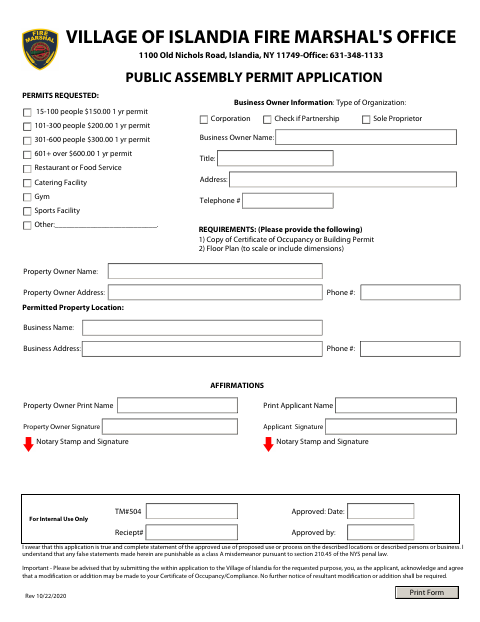
This application requests a Village of Islandia public assembly permit and is completed by the business owner or applicant for the permitted property.
- licensed online notary
- ~15 min average
- Notarized PDF emailed
What you’ll need
- Government-issued photo ID
- Webcam-enabled device (laptop or phone)
- This form, ready to upload as a PDF
What this form is
The Village of Islandia Fire Marshal’s Office application collects business, property owner, applicant, organization, and event information for a public assembly permit. Applicants are asked to provide a Certificate of Occupancy or Building Permit and a floor plan, and the form lists annual permit fees by expected attendance. The applicant affirms the information is true and complete and acknowledges that the Certificate of Occupancy or Compliance may be modified.
Who needs it
A business owner or applicant seeking a Village of Islandia public assembly permit should complete the application and provide the listed supporting documents.
Why it needs a notary
The form contains a sworn applicant affirmation and notary stamp and signature fields; the applicant signs the affirmation before a commissioned online notary.
How to get this notarized
- 1
Download the Application
Get the Public Assembly Permit Application from the Village of Islandia.
- 2
Complete the Form
Enter the requested business, property, owner, applicant, organization, and permit information.
- 3
Gather Supporting Documents
Prepare a Certificate of Occupancy or Building Permit and a floor plan with scale or dimensions.
- 4
Book an Online Notary
Schedule a session with a commissioned online notary before signing the sworn affirmation.
- 5
Sign on Video
Follow the notary’s instructions and sign the affirmation during the online session.
- 6
Submit to the Village
Send the completed application and supporting documents to the Village of Islandia Fire Marshal’s Office.
Preview the form
The blank PDF straight from Islandia. Look it over, then upload your filled copy to start the notary session.

You’ll need ID and a webcam.
A licensed online notary will join you on video, verify your government-issued ID, witness your signature, and apply their seal. You’ll receive the notarized PDF by email when the session ends.
Frequently asked questions
- How do I complete the public assembly permit application?
- Fill in the business, property, applicant, and permit details, gather the Certificate of Occupancy or Building Permit and floor plan, then sign the affirmation before a commissioned online notary.
- Do I need to sign the application in front of a notary?
- The form includes a sworn affirmation and notary stamp and signature fields. The applicant should sign the affirmation before a commissioned online notary.
- What supporting documents does the form request?
- The application lists a copy of the Certificate of Occupancy or Building Permit and a floor plan, either to scale or with dimensions.
- Can I use an online notary for this form?
- New York authorizes its notaries to perform remote online notarizations under Executive Law §135-c. A commissioned online notary can guide you through signing the affirmation on video; confirm with the city, town or village if unsure.
Other forms in Islandia
Public Assembly Permit Application in other New York cities
Each city publishes its own version of this form. Pick the city where you’re filing.