
Old Field, NY · Suffolk County
Tree Zoning Permit and Environmental Assessment Application
This application and affidavit collects project, tree-clearing, excavation, and environmental details from property owners or authorized agents seeking a Village of Old Field tree or zoning permit.
- licensed online notary
- ~15 min average
- Notarized PDF emailed
What you’ll need
- Government-issued photo ID
- Webcam-enabled device (laptop or phone)
- This form, ready to upload as a PDF
What this form is
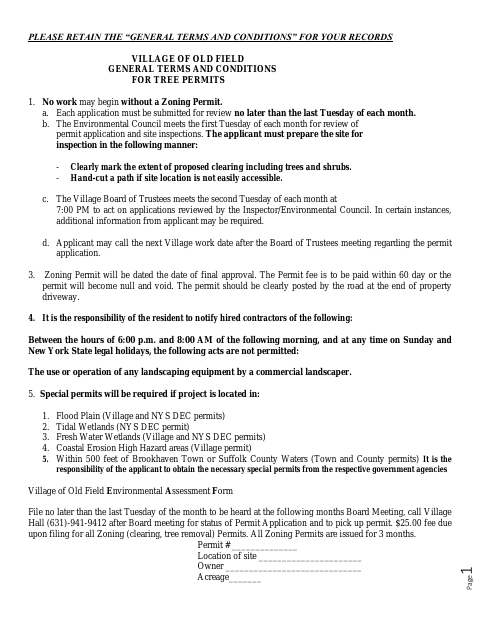
The form asks applicants to describe proposed work, tree and shrub removal, excavation, fill, truck access, erosion controls, and nearby environmental features. Old Field uses the application to review tree and clearing projects for zoning permits; it must be submitted by the last Tuesday of the month to be considered at the following month’s Board meeting. The form also includes an affidavit affirming that the application statements are true.
Who needs it
Property owners or authorized agents applying for an Old Field zoning permit for tree removal, clearing, or related work should complete this application.
How to get this notarized
- 1
Download The Application
Get the Tree Zoning Permit and Environmental Assessment Application from the Village of Old Field.
- 2
Fill In The Project Details
Answer the applicable questions about the property, proposed work, clearing, excavation, fill, and environmental features.
- 3
Book An Online Notary
Schedule a session with a commissioned online notary for the page 3 affidavit.
- 4
Sign And Swear On Video
Show identification and sign and swear to the affidavit during the online notarization session.
- 5
Submit To The Village
Send the completed application to the Village of Old Field by its stated monthly filing deadline.
Preview the form
The blank PDF straight from Old Field. Look it over, then upload your filled copy to start the notary session.

You’ll need ID and a webcam.
A licensed online notary will join you on video, verify your government-issued ID, witness your signature, and apply their seal. You’ll receive the notarized PDF by email when the session ends.
Frequently asked questions
- How do I get the affidavit notarized online?
- Complete the application, then book with a commissioned online notary. Sign and swear to the affidavit during the video session, following the notary’s instructions.
- Do I need to sign the affidavit in front of a notary?
- Yes. The application includes a “Sworn to before me” jurat. The property owner or authorized agent should sign and swear to the statements before a notary.
- Who can sign the application affidavit?
- The form allows the property owner or an authorized agent to make the affidavit. It states that the application information must be true to the best of the signer’s knowledge.
- What should I do after notarization?
- Submit the completed application to the Village for review. It must arrive by the last Tuesday of the month to be considered at the following month’s Board meeting; confirm with the city, town or village if unsure.
- Can I use an online notary for this form?
- New York authorizes its own notaries to perform remote online notarizations. Ask the Village whether it accepts an electronically notarized version of this application before submitting it.