
White Plains, NY · Westchester County
Builder's Affidavit for Final Inspection
This sworn application is completed by a builder or authorized business representative seeking a final inspection and Certificate of Occupancy for permitted construction in White Plains.
- licensed online notary
- ~15 min average
- Notarized PDF emailed
What you’ll need
- Government-issued photo ID
- Webcam-enabled device (laptop or phone)
- This form, ready to upload as a PDF
What this form is
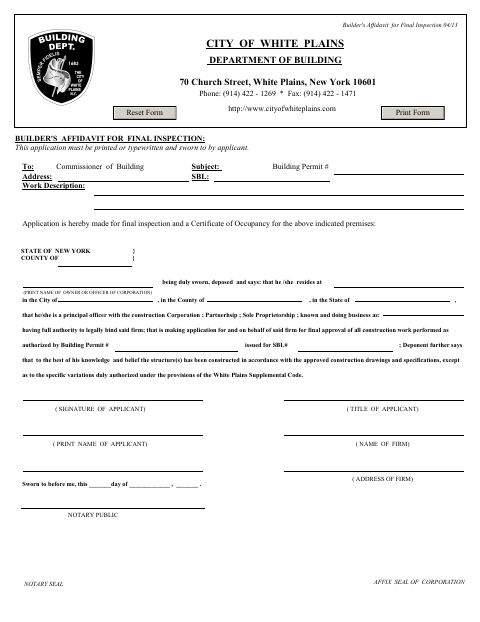
The Builder's Affidavit for Final Inspection asks the applicant to identify the building permit, property, work, and construction business, then affirm that the work generally follows approved drawings and specifications, subject to authorized variations. The City of White Plains Department of Building requires the application for a final inspection and Certificate of Occupancy. It must be printed or typewritten and sworn to by the applicant.
Who needs it
A builder or authorized representative applying for final approval of construction work under a White Plains building permit needs to complete this affidavit.
How to get this notarized
- 1
Download the Form
Get the Builder's Affidavit for Final Inspection from the City of White Plains.
- 2
Fill In the Application
Print or type the property, permit, work, and business details, and complete the applicant information.
- 3
Book an Online Notary
Arrange a session with a commissioned online notary before signing the affidavit.
- 4
Sign on Video
Show identification and swear to the affidavit during the online notary session.
- 5
Submit to the City
Send the completed affidavit to the White Plains Department of Building as part of the final inspection application.
Preview the form
The blank PDF straight from White Plains. Look it over, then upload your filled copy to start the notary session.

You’ll need ID and a webcam.
A licensed online notary will join you on video, verify your government-issued ID, witness your signature, and apply their seal. You’ll receive the notarized PDF by email when the session ends.
Frequently asked questions
- How do I get the Builder's Affidavit notarized online?
- Complete the form, then meet with a commissioned online notary by video. Sign and swear to the affidavit during the session, and submit it to the City of White Plains Department of Building.
- Do I need to sign the affidavit in front of a notary?
- Yes. The form says the application must be sworn to by the applicant and includes a jurat for the notary to complete.
- Can I use an online notary for this form?
- New York authorizes remote online notarization by its notaries under Executive Law §135-c, in effect since 2023. Confirm with the city, town or village if unsure.
Other forms in White Plains
Affidavit of Cost
White Plains
Architect/Engineer's Affidavit for Final Inspection
White Plains
Building Long Form Application (Volume Added)
White Plains
Designer’s Affidavit for Approval of Plans and Specifications
White Plains
Look-Alike Affidavit for One- and Two-Family Dwellings
White Plains
Owner's Affidavit for Construction Field Inspection
White Plains