
White Plains, NY · Westchester County
Building Long Form Application (Volume Added)
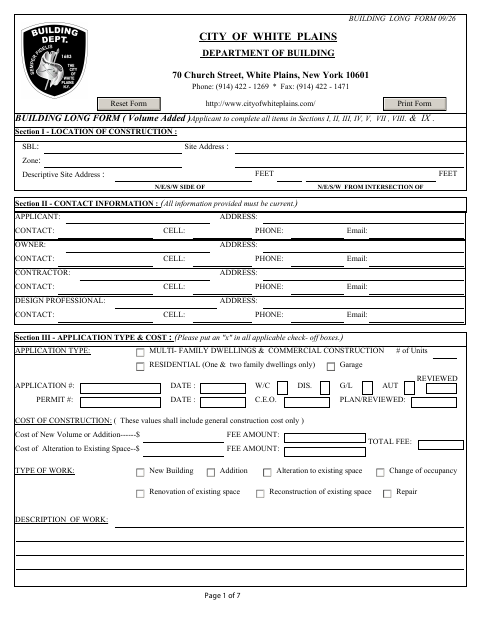
This seven-page application is for property owners, applicants, and contractors seeking a White Plains building permit for construction that adds building volume.
- licensed online notary
- ~15 min average
- Notarized PDF emailed
What you’ll need
- Government-issued photo ID
- Webcam-enabled device (laptop or phone)
- This form, ready to upload as a PDF
What this form is
The application records the construction location, contacts, work type and cost, proposed occupancy, and construction details. White Plains requires a completed Building Long Form with the appropriate fee for work involving added volume; the form also lists supporting plans, documents, and approvals that may apply. Filing the application does not authorize construction to begin, and the form says applications must be filed in person at the Building Department.
Who needs it
Applicants seeking a White Plains building permit for construction that adds volume should complete this form and provide the applicable fee and supporting materials.
Why it needs a notary
Section VII contains a jurat: the applicant or contractor whose signature appears on the affidavit must swear to it before a notary public.
How to get this notarized
- 1
Download The Application
Get the Building Long Form from the White Plains Department of Building.
- 2
Complete The Applicable Sections
Fill in the required project, contact, work, occupancy, and construction details, and gather applicable supporting materials.
- 3
Book An Online Notary
Schedule a video appointment to notarize the applicant’s Section VII affidavit.
- 4
Sign And Swear On Video
Sign the affidavit and swear to its statements before the commissioned online notary during the session.
- 5
Submit The Application In Person
File the completed application and applicable fee with the Building Department as directed by the form.
Preview the form
The blank PDF straight from White Plains. Look it over, then upload your filled copy to start the notary session.

You’ll need ID and a webcam.
A licensed online notary will join you on video, verify your government-issued ID, witness your signature, and apply their seal. You’ll receive the notarized PDF by email when the session ends.
Frequently asked questions
- How do I notarize the Building Long Form?
- Complete the application and book a video appointment with a commissioned online notary. Sign and swear to Section VII during the session, then follow the form’s instructions to file the application in person.
- Do I need to notarize the owner certification too?
- Section VII is explicitly marked for completion by the applicant and notarization. Section VIII says the property owner signs if applicable; it does not label that certification as notarized.
- Can I submit this form online?
- The form says to file in person at the Building Department. It also states that filing the application does not constitute a permit to commence construction.
- Can I sign the affidavit with an online notary?
- New York authorizes remote online notarization for its own notaries under Executive Law §135-c, in effect since 2023. Ask the Building Department if you are unsure whether it will accept your notarized submission.
- Which supporting documents may be required?
- The form lists items such as a topographic survey-plot plan, signed and sealed plans, insurance certificates, and other approvals or affidavits depending on the project. Confirm with the city, town or village if unsure.
Other forms in White Plains
Affidavit of Cost
White Plains
Architect/Engineer's Affidavit for Final Inspection
White Plains
Builder's Affidavit for Final Inspection
White Plains
Designer’s Affidavit for Approval of Plans and Specifications
White Plains
Look-Alike Affidavit for One- and Two-Family Dwellings
White Plains
Owner's Affidavit for Construction Field Inspection
White Plains