
White Plains, NY · Westchester County
Designer’s Affidavit for Approval of Plans and Specifications
This sworn affidavit supports a building permit application and is completed by the architect or professional engineer applying for approval of plans and specifications in White Plains.
- licensed online notary
- ~15 min average
- Notarized PDF emailed
What you’ll need
- Government-issued photo ID
- Webcam-enabled device (laptop or phone)
- This form, ready to upload as a PDF
What this form is
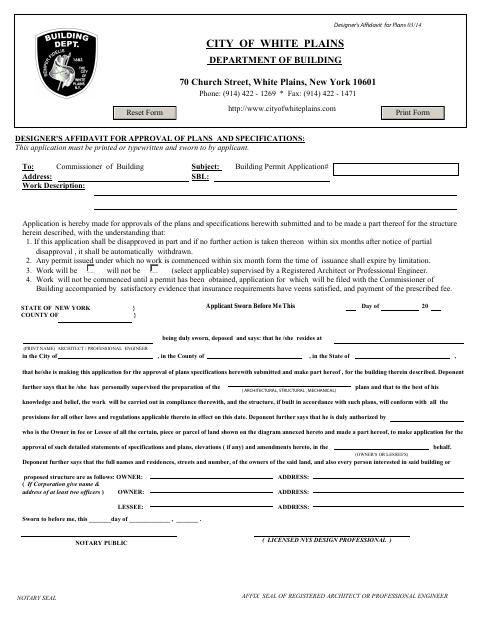
The affidavit accompanies plans and specifications submitted to the White Plains Department of Building for approval. The designer states that they supervised preparation of the plans, describes the proposed work and supervision, and provides information about the property’s owners and other interested parties. The form also sets out conditions concerning disapproval, permit timing, and starting work; applicants should complete it with the related building permit materials.
Who needs it
An architect or professional engineer applying for approval of building plans and specifications in White Plains needs to complete and swear to this affidavit.
Why it needs a notary
The form contains a sworn affidavit and jurat-style “Sworn to before me” blocks; the applicant identified as the architect or professional engineer signs and swears before the notary.
How to get this notarized
- 1
Download the Form
Get the Designer’s Affidavit for Approval of Plans and Specifications from the White Plains Department of Building.
- 2
Fill Out the Application
Complete the applicant, project, property, supervision, and owner information, then review the statements before signing.
- 3
Book an Online Notary
Schedule a session with a commissioned online notary and have the completed form ready.
- 4
Sign on Video
Sign and swear to the affidavit during the live video session, following the notary’s instructions.
- 5
Submit to the City
Send the notarized affidavit with the plans and related building permit materials to the White Plains Department of Building.
Preview the form
The blank PDF straight from White Plains. Look it over, then upload your filled copy to start the notary session.

You’ll need ID and a webcam.
A licensed online notary will join you on video, verify your government-issued ID, witness your signature, and apply their seal. You’ll receive the notarized PDF by email when the session ends.
Frequently asked questions
- How do I get the Designer’s Affidavit notarized online?
- Complete the form, book with a commissioned online notary, and sign and swear to the affidavit during the video session. Submit the notarized form with your plans to the city.
- Do I need to sign this affidavit in front of a notary?
- Yes. The form says the application must be sworn to and includes “Sworn to before me” blocks. The applicant identified as the architect or professional engineer signs and swears before a notary.
- Can I use remote online notarization for this form?
- New York authorizes its notaries to perform remote online notarizations. Use a commissioned online notary, and confirm with the city, town or village if unsure whether it accepts the notarized form.
Other forms in White Plains
Affidavit of Cost
White Plains
Architect/Engineer's Affidavit for Final Inspection
White Plains
Builder's Affidavit for Final Inspection
White Plains
Building Long Form Application (Volume Added)
White Plains
Look-Alike Affidavit for One- and Two-Family Dwellings
White Plains
Owner's Affidavit for Construction Field Inspection
White Plains