
Columbus, OH · Franklin County
Building Permit Owner Affidavit
This affidavit lets a property owner state that they qualify as an owner, accept responsibility for permitted work, and make required commitments when applying for a Columbus building permit.
- licensed online notary
- ~15 min average
- Notarized PDF emailed
What you’ll need
- Government-issued photo ID
- Webcam-enabled device (laptop or phone)
- This form, ready to upload as a PDF
What this form is
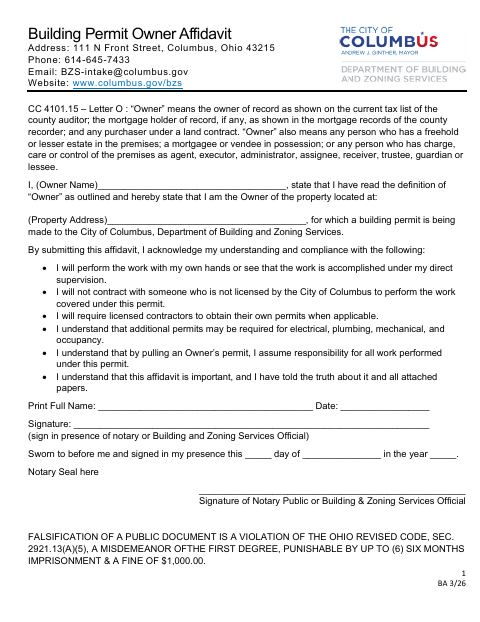
The form identifies the property and asks the signer to affirm that they meet the stated definition of “Owner.” It also records the owner’s commitments about performing or supervising the work, using licensed contractors, and assuming responsibility for work under the permit. The City of Columbus Department of Building and Zoning Services uses it with a building permit application made by an owner.
Who needs it
A person applying for a Columbus building permit as the property owner needs this form to affirm ownership and accept responsibility for the permitted work.
Why it needs a notary
The form has a jurat beginning “Sworn to before me”; the owner signs the affidavit in front of a notary public or Building and Zoning Services official.
How to get this notarized
- 1
Download the Affidavit
Get the Building Permit Owner Affidavit from the City of Columbus.
- 2
Fill In the Form
Enter the owner’s name and property address, review the commitments, and leave the signature for the appointment.
- 3
Book an Online Notary
Schedule a remote session with a commissioned online notary.
- 4
Sign on Video
Show identification and sign the affidavit during the notary’s video session.
- 5
Submit to the City
Submit the completed affidavit with the building permit application to Columbus Building and Zoning Services.
Preview the form
The blank PDF straight from Columbus. Look it over, then upload your filled copy to start the notary session.

You’ll need ID and a webcam.
A licensed online notary will join you on video, verify your government-issued ID, witness your signature, and apply their seal. You’ll receive the notarized PDF by email when the session ends.
Frequently asked questions
- How do I notarize the Building Permit Owner Affidavit online?
- Complete the form but wait to sign. Book a session with a commissioned online notary, then sign during the video appointment and submit the completed affidavit to the city.
- Do I need a notary for this owner affidavit?
- The form says to sign in the presence of a notary or a Building and Zoning Services official. Confirm with the city or village if unsure which option it will accept.
- Can I sign this affidavit before the notary appointment?
- The form directs the owner to sign in the notary’s or Building and Zoning Services official’s presence. Wait to sign until your appointment.
- Does the affidavit make me responsible for the permitted work?
- The form states that by pulling an Owner’s permit, the owner assumes responsibility for all work performed under that permit.
- Can I use an online notary for this Columbus form?
- Ohio authorizes its notaries to perform online notarizations under R.C. §§147.60–147.66. Check with Columbus Building and Zoning Services about submitting the remotely notarized affidavit.