
Eugene, OR · Lane County
Sample Affidavit of Posting
This sample affidavit lets an applicant or representative certify that a neighborhood or applicant meeting sign was posted on the subject property for a Eugene project.
- licensed online notary
- ~15 min average
- Notarized PDF emailed
What you’ll need
- Government-issued photo ID
- Webcam-enabled device (laptop or phone)
- This form, ready to upload as a PDF
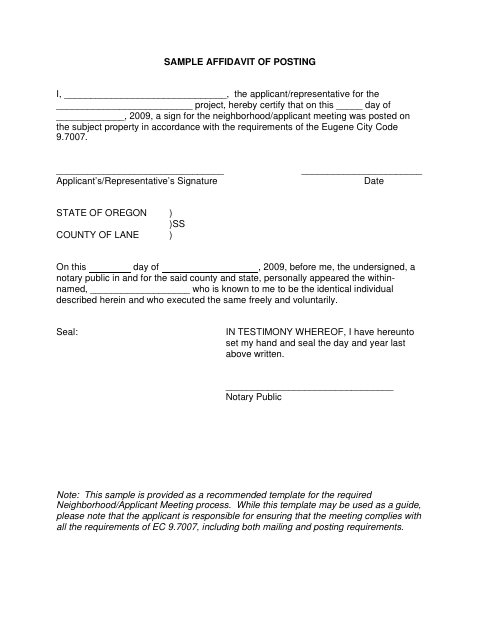
What this form is
The applicant or representative uses this affidavit to certify when a sign for a neighborhood or applicant meeting was posted on the subject property. Eugene provides it as a recommended template for the meeting process under Eugene City Code 9.7007. The form notes that the applicant is responsible for meeting all requirements, including both mailing and posting.
Who needs it
An applicant or representative for a Eugene project uses this form to document posting a neighborhood or applicant meeting sign on the subject property.
Why it needs a notary
The form has a State of Oregon and County of Lane appearance block; the applicant or representative signs, and the notary records the signer’s appearance and voluntary execution.
How to get this notarized
- 1
Download the Form
Get Eugene’s Sample Affidavit of Posting and review its instructions and notary block.
- 2
Fill In the Details
Enter the applicant or representative, project, and date the sign was posted on the subject property.
- 3
Book an Online Notary
Arrange an appointment with a commissioned online notary and have identification ready.
- 4
Sign on Video
Sign the affidavit during the online notarization session so the notary can complete the appearance block.
- 5
Submit to the City
Follow Eugene’s instructions for submitting the completed affidavit as part of the meeting process.
Preview the form
The blank PDF straight from Eugene. Look it over, then upload your filled copy to start the notary session.

You’ll need ID and a webcam.
A licensed online notary will join you on video, verify your government-issued ID, witness your signature, and apply their seal. You’ll receive the notarized PDF by email when the session ends.
Frequently asked questions
- How do I complete the Affidavit of Posting?
- Fill in the applicant or representative name, project, and posting date. Sign before a notary, then follow Eugene’s instructions for the neighborhood or applicant meeting process.
- Do I need to sign this affidavit in front of a notary?
- Yes. The form includes a notary block, so the applicant or representative should sign before a notary.
- Can I use an online notary for this form?
- Oregon law authorizes remote notarization by a commissioned online notary, and the Oregon Secretary of State confirms a properly notarized out-of-state RON document is valid in Oregon.
- Does this affidavit prove I met every meeting requirement?
- No. The form says the applicant is responsible for ensuring the meeting complies with all requirements, including both mailing and posting.
- What if I am unsure whether Eugene requires this form?
- The PDF describes this sample as a recommended template for the required Neighborhood/Applicant Meeting process. Confirm with the city or county clerk if unsure.