
Gresham, OR · Multnomah County
Design Review C Application
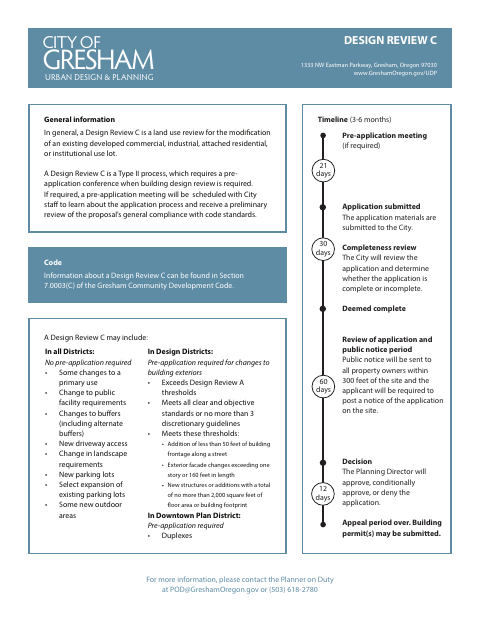
The Design Review C application is used by property owners or their representatives to request city review of certain changes to an existing developed commercial, industrial, attached residential, or institutional lot.
- licensed online notary
- ~15 min average
- Notarized PDF emailed
What you’ll need
- Government-issued photo ID
- Webcam-enabled device (laptop or phone)
- This form, ready to upload as a PDF
What this form is
Use this application to request review of qualifying changes to an existing developed lot, such as certain use changes, driveway access, landscaping, parking, outdoor areas, or building exterior work. Gresham reviews the application for completeness, sends public notice, and issues a decision; the form estimates a three-to-six-month timeline. A notarized signature authorizes City personnel and representatives to enter the site for inspection in connection with the land use application.
Who needs it
Property owners seeking qualifying changes to an existing developed lot, and representatives applying on an owner's behalf, may need to submit this form to the City of Gresham.
Why it needs a notary
The form includes a State of Oregon and Multnomah County jurat; the property owner signs and swears or affirms before the notary, while a representative may also sign.
How to get this notarized
- 1
Download the Application
Get the Design Review C application and its submittal checklist from the City of Gresham.
- 2
Fill Out the Form
Provide the applicant, property, and review information, and gather the listed attachments.
- 3
Book an Online Notary
Arrange a session with a commissioned online notary for the signature requiring a jurat.
- 4
Sign on Video
Sign and swear or affirm before the notary during the remote video session.
- 5
Submit to the City
Submit the completed application and required attachments to the City of Gresham.
Preview the form
The blank PDF straight from Gresham. Look it over, then upload your filled copy to start the notary session.

You’ll need ID and a webcam.
A licensed online notary will join you on video, verify your government-issued ID, witness your signature, and apply their seal. You’ll receive the notarized PDF by email when the session ends.
Frequently asked questions
- How do I complete the notarized signature on this application?
- Complete the application, then sign and swear or affirm before a commissioned online notary. The jurat includes spaces for the notary's signature, stamp, and commission expiration.
- Do I need a notarized letter of authorization?
- The attachment list calls for a notarized Letter of Authorization if there is no owner signature on the application. The application also includes a notarized owner signature authorizing site entry.
- Can I use remote online notarization for this form?
- Oregon authorizes remote notarization under ORS 194.277, and the Secretary of State says a properly notarized out-of-state remote online notarization document is valid in Oregon. Use a commissioned online notary and check the city's acceptance requirements.
- What happens after I submit the application?
- The City reviews the application for completeness. Once complete, it reviews the proposal and provides public notice to property owners within 300 feet; the Planning Director then approves, conditionally approves, or denies it.
- Where can I check whether my application materials are complete?
- Review the form's attachment list and submittal checklist. For filing or acceptance questions, confirm with the city or county clerk if unsure.