
Gresham, OR · Multnomah County
Farmers’ Markets & Special Events Temporary Use Permit
This temporary use permit application is for property owners or their authorized representatives seeking approval to operate a farmers’ market or special event at a Gresham site.
- licensed online notary
- ~15 min average
- Notarized PDF emailed
What you’ll need
- Government-issued photo ID
- Webcam-enabled device (laptop or phone)
- This form, ready to upload as a PDF
What this form is
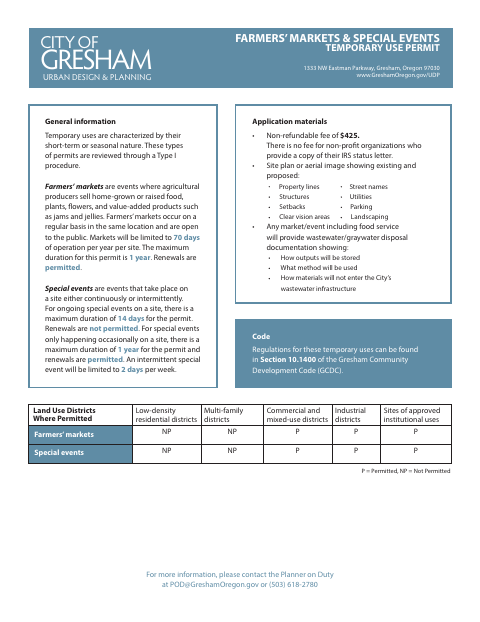
Gresham uses this application to review temporary farmers’ markets and special events through a Type I procedure. Applicants describe the use, operating dates, site location, parking, signs, and other details; they also provide a site plan or aerial image and, for events with food service, wastewater or graywater disposal documentation. The form states applicable operating limits, fees, and permit conditions.
Who needs it
A property owner or authorized representative seeking a Gresham permit for a farmers’ market or continuous or intermittent special event needs this application.
Why it needs a notary
The application carries a State of Oregon and County of Multnomah jurat; the applicant or property owner signs the authorization before the notary.
How to get this notarized
- 1
Download the Permit Form
Get the Farmers’ Markets & Special Events Temporary Use Permit application from the City of Gresham.
- 2
Complete the Application
Describe the proposed use, schedule, location, parking, and signs, and gather the required site plan or aerial image and any applicable wastewater documentation.
- 3
Book an Online Notary
Arrange a session with a commissioned online notary for the applicant, representative, or owner signing the authorization.
- 4
Sign on Video
Sign the authorization during the online notary session and complete the jurat process.
- 5
Submit to the City
Send the completed application and required supporting materials to the City of Gresham.
Preview the form
The blank PDF straight from Gresham. Look it over, then upload your filled copy to start the notary session.

You’ll need ID and a webcam.
A licensed online notary will join you on video, verify your government-issued ID, witness your signature, and apply their seal. You’ll receive the notarized PDF by email when the session ends.
Frequently asked questions
- Who signs the temporary use permit application?
- The form provides a signature line for the applicant or representative, or the property owner. The signer affirms they understand the permit conditions and are the owner or an authorized representative.
- How do I submit this permit application?
- Complete the application and provide the required site plan or aerial image. Include wastewater or graywater disposal documentation if the market or event includes food service, then submit the materials to the City of Gresham.
- Do I need to sign the application in front of a notary?
- Yes. The authorization section includes a notarial jurat, so the applicant, representative, or owner signing that section must sign before a notary.
- Can I use a commissioned online notary?
- Oregon’s Secretary of State FAQ confirms that a properly notarized remote online notarization document is valid in Oregon. You can sign with a commissioned online notary; confirm with the city or county clerk if unsure.