
Gresham, OR · Multnomah County
Lodging And Warming/Cooling Shelters Temporary Use Permit
This application requests a temporary-use permit for intermittent lodging or a warming/cooling shelter, and is filed by the property owner or an authorized representative with Gresham Urban Design & Planning.
- licensed online notary
- ~15 min average
- Notarized PDF emailed
What you’ll need
- Government-issued photo ID
- Webcam-enabled device (laptop or phone)
- This form, ready to upload as a PDF
What this form is
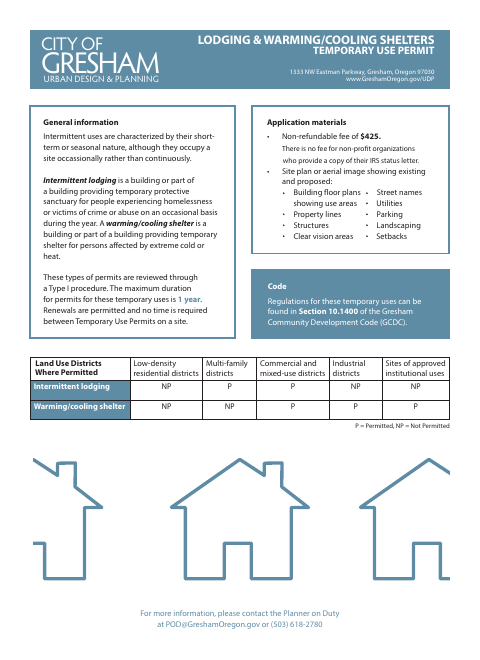
Use this form to describe the proposed intermittent lodging or warming/cooling shelter, its location, operating schedule, and the applicant’s authorization. Gresham reviews these applications through a Type I procedure, and the permit may last up to one year; renewals are permitted. Submit the required site plan or aerial image and applicable fee, with a copy of an IRS status letter for a nonprofit seeking the fee exemption.
Who needs it
A property owner or authorized representative seeking Gresham approval to operate intermittent lodging or a warming/cooling shelter at a specified site needs this permit.
Why it needs a notary
The form carries a State of Oregon jurat, and the applicant or authorized representative, or the owner, signs the authorization before the notary.
How to get this notarized
- 1
Download the Permit
Get the Lodging and Warming/Cooling Shelters Temporary Use Permit from the City of Gresham.
- 2
Complete the Application
Describe the use, location, schedule, and property-line distances, and provide the required site plan or aerial image.
- 3
Book an Online Notary
Arrange a session with a commissioned online notary for the form’s jurat.
- 4
Sign on Video
Sign the authorization before the notary during your online session.
- 5
Submit to the City
Send the completed application, supporting materials, and applicable fee to Gresham Urban Design & Planning.
Preview the form
The blank PDF straight from Gresham. Look it over, then upload your filled copy to start the notary session.

You’ll need ID and a webcam.
A licensed online notary will join you on video, verify your government-issued ID, witness your signature, and apply their seal. You’ll receive the notarized PDF by email when the session ends.
Frequently asked questions
- How do I apply for Gresham’s shelter temporary-use permit?
- Complete the form with the proposed use, location, operating schedule, and authorization. Include a site plan or aerial image and submit the application and applicable fee to Gresham Urban Design & Planning.
- Do I need to sign this permit application before a notary?
- Yes. The authorization section includes a jurat stating that the signature is sworn or affirmed before a notary. The applicant or authorized representative, or the owner, signs there.
- Can I use a commissioned online notary for this form?
- Oregon permits remote notarization by its notaries under ORS 194.277, and ORS 194.260 recognizes certain notarial acts performed elsewhere. The Oregon Secretary of State FAQ confirms a properly notarized remote document is valid in Oregon.
- What should I include with the application?
- The form calls for a site plan or aerial image showing existing and proposed features. The fee is non-refundable; nonprofit organizations may provide an IRS status letter for the fee exemption. Confirm with the city or county clerk if unsure.