
Gresham, OR · Multnomah County
Single Family Residential Permit
This permit application is for property owners or representatives seeking approval to place a single-family residence, duplex, or manufactured home on a previously undeveloped lot in Gresham.
- licensed online notary
- ~15 min average
- Notarized PDF emailed
What you’ll need
- Government-issued photo ID
- Webcam-enabled device (laptop or phone)
- This form, ready to upload as a PDF
What this form is
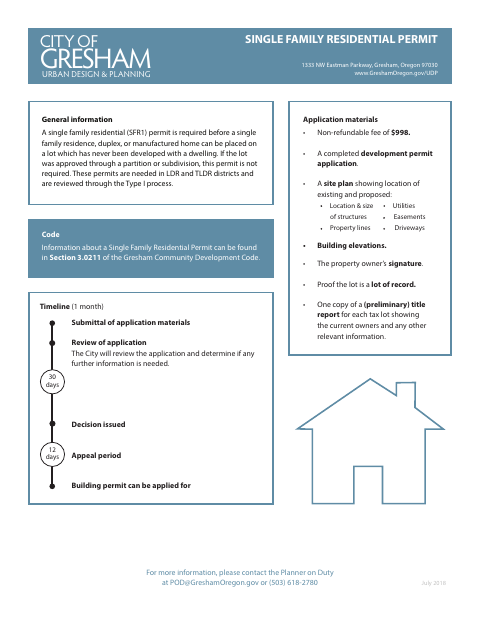
Gresham requires this permit before a single-family residence, duplex, or manufactured home can be placed on a lot that has never had a dwelling, unless the lot was approved through a partition or subdivision. Applicants submit a completed development permit application, site plan, building elevations, ownership and lot-of-record proof, title report, fee, and other applicable checklist items. The form also includes a notarized authorization for City staff and others to enter the site for inspection.
Who needs it
Property owners applying to place a residence, duplex, or manufactured home on a qualifying undeveloped lot in Gresham need this permit application.
Why it needs a notary
The form includes a State of Oregon, Multnomah County jurat; the applicant and, if applicable, representative sign the site-entry authorization before the notary.
How to get this notarized
- 1
Download the Form
Download Gresham’s Single Family Residential Permit application and review the application materials and attachment checklist.
- 2
Complete the Application
Fill in the development permit application and prepare the required plans, ownership proof, title report, fee, and applicable attachments.
- 3
Book an Online Notary
Schedule a session with a commissioned online notary for the notarized site-entry authorization.
- 4
Sign on Video
Sign the authorization during the online notary session; include the representative signature if signing on behalf of the owner.
- 5
Submit to the City
Submit the completed application and required materials to the City of Gresham following its packet and plan-submission instructions.
Preview the form
The blank PDF straight from Gresham. Look it over, then upload your filled copy to start the notary session.

You’ll need ID and a webcam.
A licensed online notary will join you on video, verify your government-issued ID, witness your signature, and apply their seal. You’ll receive the notarized PDF by email when the session ends.
Frequently asked questions
- How do I get the residential permit authorization notarized?
- Complete the application, then book a session with a commissioned online notary. Sign the authorization during the video session and include the notarized form with your permit materials.
- Do I need to notarize the application?
- The form calls for notarized signatures on the site-entry authorization. It says a notarized Letter of Authorization is needed if there is no owner signature below.
- Can I use an online notary for this form?
- Oregon authorizes remote notarization by its notaries under ORS 194.277, and ORS 194.260 recognizes certain notarial acts performed elsewhere. The Oregon Secretary of State FAQ confirms a properly notarized out-of-state remote online notarization is valid in Oregon.
- Where do I submit the permit application?
- Submit the application materials to the City of Gresham as directed by its Urban Design & Planning department. For filing or recording questions beyond this permit packet, confirm with the city or county clerk if unsure.