
Oakmont, PA · Allegheny County
Certificate of Ownership and Use
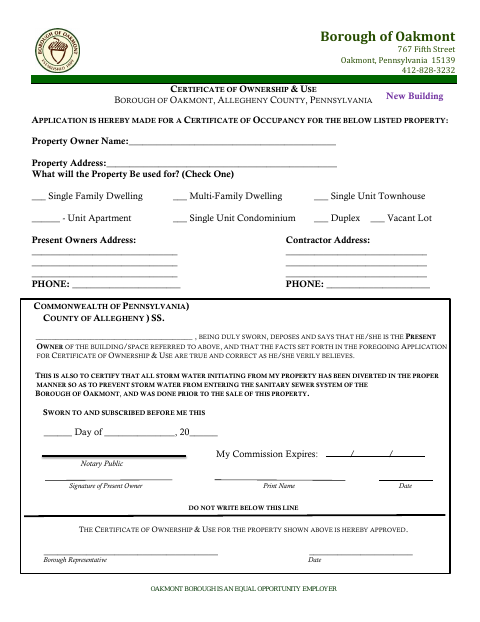
This certificate is an application for an occupancy certificate that identifies a property’s owner, address, and intended use; the present owner completes and swears to its statements.
- licensed online notary
- ~15 min average
- Notarized PDF emailed
What you’ll need
- Government-issued photo ID
- Webcam-enabled device (laptop or phone)
- This form, ready to upload as a PDF
What this form is
Oakmont’s Certificate of Ownership and Use is an application for a certificate of occupancy for a listed property. The present owner provides the property address and intended use, then swears that the application facts are true and that storm water was diverted to keep it out of the Borough sanitary sewer system. The form is labeled for a new building and includes a section for Borough approval.
Who needs it
The present owner of the listed building or space completes this form when applying for an Oakmont certificate of occupancy for a new building.
Why it needs a notary
The present owner signs the sworn statement before the notary, affirming the application facts and storm-water diversion statement; the form includes a jurat.
How to get this notarized
- 1
Download the Form
Get Oakmont’s Certificate of Ownership and Use for a new building.
- 2
Fill In the Property Details
Enter the owner and property information and select the intended property use.
- 3
Book an Online Notary
Schedule a remote session with a commissioned online notary.
- 4
Sign on Video
Sign the sworn owner statement during the notary’s video session.
- 5
Submit to the Borough
Send the completed application to the Borough for its review and approval.
Preview the form
The blank PDF straight from Oakmont. Look it over, then upload your filled copy to start the notary session.

You’ll need ID and a webcam.
A licensed online notary will join you on video, verify your government-issued ID, witness your signature, and apply their seal. You’ll receive the notarized PDF by email when the session ends.
Frequently asked questions
- How do I complete the Certificate of Ownership and Use?
- Enter the property and owner details, select the property’s intended use, and complete the sworn statement. Sign before a commissioned online notary, then submit the application to the Borough.
- Do I need to sign this form in front of a notary?
- Yes. The present owner’s statement says it must be sworn to and subscribed before a notary public. Complete the notarized section before submitting the application.
- Can I use an online notary for this form?
- Pennsylvania permits a commissioned online notary to perform remote notarizations. The notary will verify your identity and witness your signature during a video session.
- What if I am unsure whether Oakmont requires this form?
- The form is an application for a certificate of occupancy and is labeled for a new building. Confirm with the city, borough or township if unsure.