
Bluffton, SC · Beaufort County
Grounding Affidavit
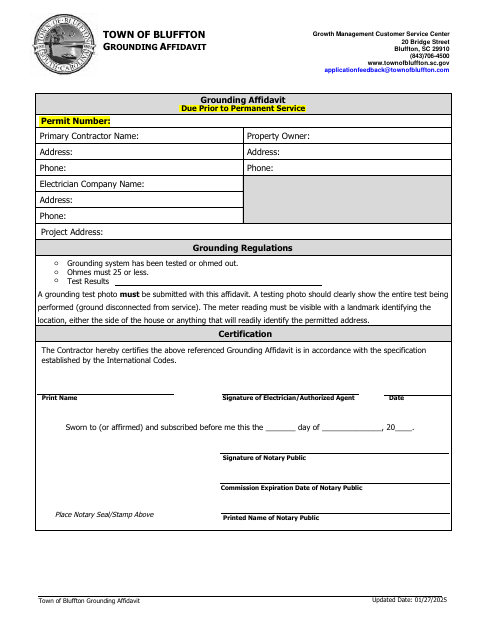
This affidavit documents a contractor’s grounding certification and test information for the Town of Bluffton, with the contractor or authorized agent signing before a notary.
- licensed online notary
- ~15 min average
- Notarized PDF emailed
What you’ll need
- Government-issued photo ID
- Webcam-enabled device (laptop or phone)
- This form, ready to upload as a PDF
What this form is
The Town of Bluffton form is a grounding affidavit due before a permanent service permit. It identifies the contractor, property owner, electrician, and project address, and includes the contractor’s certification that the affidavit follows specifications established by the International Codes. The form also asks whether the grounding system was tested, records test results, and requires a testing photo showing the meter reading and a location landmark.
Who needs it
A contractor completing the grounding affidavit for a Bluffton permanent service permit needs this form, with the electrician or an authorized agent signing the certification.
Why it needs a notary
The form has a sworn-or-affirmed and subscribed-before-me jurat; the contractor or authorized agent signs the certification before the notary.
How to get this notarized
- 1
Download The Form
Get the Town of Bluffton Grounding Affidavit from the town’s document center.
- 2
Fill In The Details
Enter the permit, contractor, property owner, electrician, and project information, and complete the grounding test fields.
- 3
Prepare The Test Photo
Include a photo showing the grounding test, visible meter reading, and a landmark that identifies the permitted address.
- 4
Book An Online Notary
Arrange an appointment with a commissioned online notary for the jurat.
- 5
Sign On Video
Sign the certification during the online notarization after the notary instructs you.
- 6
Submit To The Town
Submit the notarized affidavit and test photo to the Town of Bluffton as directed.
Preview the form
The blank PDF straight from Bluffton. Look it over, then upload your filled copy to start the notary session.

You’ll need ID and a webcam.
A licensed online notary will join you on video, verify your government-issued ID, witness your signature, and apply their seal. You’ll receive the notarized PDF by email when the session ends.
Frequently asked questions
- How do I complete the Bluffton grounding affidavit?
- Enter the permit, contractor, owner, electrician, and project details; complete the grounding test information and photo requirement; then sign the certification before a commissioned online notary.
- Do I need a photo with this affidavit?
- Yes. The form says a grounding test photo must be submitted and should show the test being performed, the visible meter reading, and a landmark identifying the permitted address.
- Can I sign this form with an online notary?
- South Carolina has not authorized remote online notarization for its own notaries. A commissioned online notary acting under the law of the jurisdiction where the notarization occurs may provide a certificate recognized in South Carolina.
- Where do I submit the completed affidavit?
- The form lists the Town of Bluffton Growth Management Customer Service Center. Confirm the submission method and any additional requirements with the city or town if unsure.
Other forms in Bluffton
Additions, Remodels & Minor Projects Permit Application
Bluffton
Unlicensed Residential Builder Disclosure Cancellation Affidavit
Bluffton
Commercial Affidavit of Ownership and Owner’s Authorized Agent
Bluffton
Commercial Building Permit Application
Bluffton
Letter of Authorization for Contractors
Bluffton
Residential Affidavit of Ownership and Owner’s Authorized Agent
Bluffton