
Bluffton, SC · Beaufort County
Residential Affidavit of Ownership and Owner’s Authorized Agent
This affidavit identifies the property owner, authorizes an agent for a Town of Bluffton building permit application, and is submitted by the owner with the application.
- licensed online notary
- ~15 min average
- Notarized PDF emailed
What you’ll need
- Government-issued photo ID
- Webcam-enabled device (laptop or phone)
- This form, ready to upload as a PDF
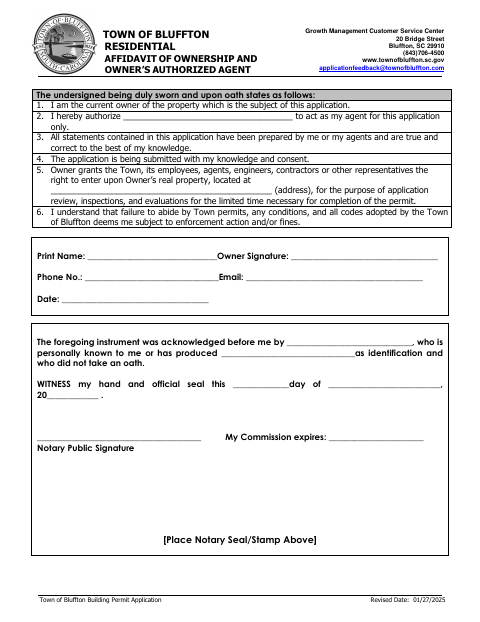
What this form is
The form states that the signer owns the property, authorizes a named agent for the application, and confirms the application is submitted with the owner’s knowledge and consent. It also grants the Town limited access to the property for application review, inspections, and evaluations, and acknowledges potential enforcement action or fines for permit or code violations. The owner completes it for a Town of Bluffton building permit application.
Who needs it
A property owner submitting a Town of Bluffton building permit application needs this form to identify an authorized agent and give the Town limited property access.
Why it needs a notary
The owner signs before a notary, who completes the acknowledgment stating the signer appeared, was identified, and did not take an oath.
How to get this notarized
- 1
Download The Form
Get the Residential Affidavit of Ownership and Owner’s Authorized Agent from the Town of Bluffton.
- 2
Fill In The Form
Complete the owner, agent, property address, phone, email, and date fields.
- 3
Book An Online Notary
Arrange a session with a commissioned online notary and check that the Town will accept the notarized form.
- 4
Sign On Video
Appear for the online notarization and sign as the owner when instructed by the notary.
- 5
Submit To The Town
Send the completed form with your building permit application to the Town of Bluffton.
Preview the form
The blank PDF straight from Bluffton. Look it over, then upload your filled copy to start the notary session.

You’ll need ID and a webcam.
A licensed online notary will join you on video, verify your government-issued ID, witness your signature, and apply their seal. You’ll receive the notarized PDF by email when the session ends.
Frequently asked questions
- How do I complete this owner affidavit?
- Enter the owner and authorized agent information, property address, and contact details. Sign and date the form before a notary, then submit it with the building permit application.
- Do I need to take an oath when signing?
- No. The form’s acknowledgment says the owner appeared before the notary and did not take an oath. The notary completes the acknowledgment and signs the certificate.
- Can I use a commissioned online notary for this form?
- South Carolina has not authorized remote online notarization by its own notaries. A commissioned online notary’s certificate may be recognized under S.C. Code §§26-1-120(G) and 26-3-20; confirm acceptance with the Town before signing.
- Where do I submit the completed form?
- The form is for the Town of Bluffton building permit application. Submit it with that application to the Town’s Growth Management Customer Service Center; confirm with the city or town if unsure.
Other forms in Bluffton
Additions, Remodels & Minor Projects Permit Application
Bluffton
Unlicensed Residential Builder Disclosure Cancellation Affidavit
Bluffton
Commercial Affidavit of Ownership and Owner’s Authorized Agent
Bluffton
Commercial Building Permit Application
Bluffton
Letter of Authorization for Contractors
Bluffton
Grounding Affidavit
Bluffton