
Nashville, TN · Davidson County
Application for Notary Public
This application is for people seeking a notary public commission through Davidson County; applicants provide personal and eligibility information, swear that their answers are true, and submit the notarized form to the County Clerk.
At a glance
- Issued by
- City of Nashville · Nashville, Davidson County, Tennessee
- Notarization
- Required: sign this form in front of a notary before filing it.
- Official source
- nashville.gov
- Blank form
- Download the PDF
- Catalogued
- Machine-readable
- JSON record · about the forms index
- licensed online notary
- ~15 min average
- Notarized PDF emailed
What you’ll need
- Government-issued photo ID
- Webcam-enabled device (laptop or phone)
- This form, ready to upload as a PDF
What this form is
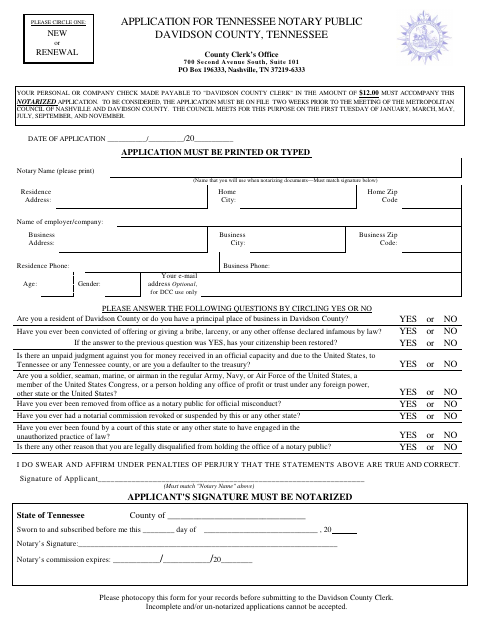
The form collects an applicant’s contact details and answers to questions about eligibility for a notary public commission. Applicants must swear that their statements are true, have the application notarized, and submit it with a $12 check payable to the Davidson County Clerk. The form says the application must be on file two weeks before a scheduled Metropolitan Council meeting to be considered, and applicants should select new or renewal.
Who needs it
People applying for a new or renewal notary public commission through the Davidson County Clerk need to complete and submit this application.
Why it needs a notary
The form includes a sworn-and-subscribed jurat; the applicant signs before the notary, who completes the notary signature and commission-expiration fields.
How to get this notarized
- 1
Download The Application
Get the Davidson County notary public application and photocopy it for your records before submitting.
- 2
Complete The Form
Print or type your information, answer each eligibility question, and select new or renewal.
- 3
Book An Online Notary
Arrange a remote online notarization with a commissioned online notary.
- 4
Sign On Video
Sign the application during the online notary session so the notary can complete the jurat.
- 5
Submit To The Clerk
Send the notarized application with the $12 check to the Davidson County Clerk, observing the form’s filing deadline.
Preview the form
The blank PDF straight from Nashville. Look it over, then upload your filled copy to start the notary session.

You’ll need ID and a webcam.
A licensed online notary will join you on video, verify your government-issued ID, witness your signature, and apply their seal. You’ll receive the notarized PDF by email when the session ends.
Frequently asked questions
- How do I submit this application?
- Complete the printed or typed form, answer the eligibility questions, select new or renewal, and have your signature notarized. Include the required $12 check and submit it to the Davidson County Clerk.
- Do I need to sign the application before a notary?
- Yes. The form states that the applicant’s signature must be notarized and that incomplete or un-notarized applications cannot be accepted.
- Can I sign this application with a commissioned online notary?
- Tennessee authorizes remote online notarization by commissioned online notaries under the Online Notary Public Act, Tenn. Code Ann. §§8-16-301 to 8-16-313. Confirm the Clerk’s submission requirements before signing online.
- When must the application be on file?
- The form says the application must be on file two weeks before the Metropolitan Council meeting to be considered. The Council meets for this purpose on the first Tuesday of January, March, May, July, September, and November; confirm with the city or town if unsure.