
Harker Heights, TX · Bell County
Final Plat Application
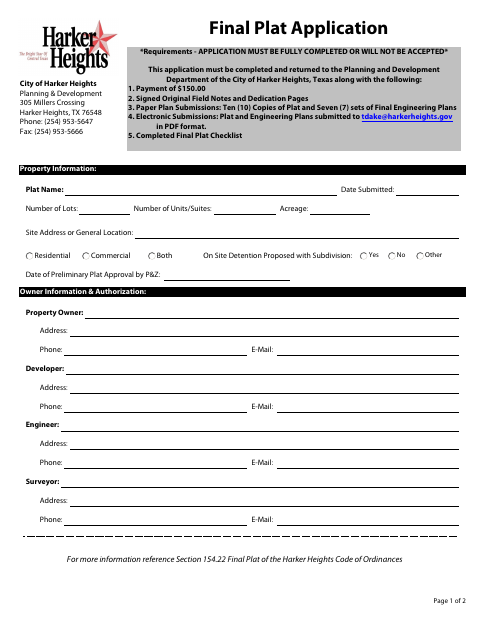
The Final Plat Application collects subdivision, property, owner, developer, engineer, and surveyor details for owners or authorized agents filing a final plat with the City of Harker Heights.
- licensed online notary
- ~15 min average
- Notarized PDF emailed
What you’ll need
- Government-issued photo ID
- Webcam-enabled device (laptop or phone)
- This form, ready to upload as a PDF
What this form is
The application records property and project information and includes the owner’s acknowledgment of subdivision requirements, improvement obligations, and meeting attendance responsibilities. The city requires a fully completed application returned to its Planning and Development Department with the listed payment, signed original field notes and dedication pages, plat and engineering plan submissions, and completed checklist.
Who needs it
Property owners or their authorized agents preparing a final plat submission for review by the City of Harker Heights should complete and return this application.
How to get this notarized
- 1
Download The Application
Get the Final Plat Application from the City of Harker Heights.
- 2
Fill In The Form
Complete the application fields and review the listed submission requirements.
- 3
Book An Online Notary
Arrange an appointment with a commissioned online notary for the sworn signature.
- 4
Sign On Video
Appear by video, sign as directed, and take the oath before the online notary.
- 5
Submit To The City
Return the completed application and required materials to the Planning and Development Department.
Preview the form
The blank PDF straight from Harker Heights. Look it over, then upload your filled copy to start the notary session.

You’ll need ID and a webcam.
A licensed online notary will join you on video, verify your government-issued ID, witness your signature, and apply their seal. You’ll receive the notarized PDF by email when the session ends.
Frequently asked questions
- How do I complete the final plat application?
- Complete all application fields, gather the payment, signed original field notes and dedication pages, plan submissions, and completed checklist listed on the form, then return everything to the Planning and Development Department.
- Do I need to sign the application in front of a notary?
- Yes. The form includes a sworn-and-subscribed jurat. The owner or authorized agent signing it must take an oath before a notary. Texas has authorized remote online notarization since 2018; confirm with the city if unsure whether it accepts an online-notarized form.
- What else must accompany the application?
- The form lists a $150 payment, signed original field notes and dedication pages, paper or electronic plat and engineering plan submissions, and a completed Final Plat Checklist.