
Harker Heights, TX · Bell County
Home Occupation Application
This packet explains Harker Heights home occupation rules and includes a business registration form for applicants describing a business operated from a residence.
- licensed online notary
- ~15 min average
- Notarized PDF emailed
What you’ll need
- Government-issued photo ID
- Webcam-enabled device (laptop or phone)
- This form, ready to upload as a PDF
What this form is
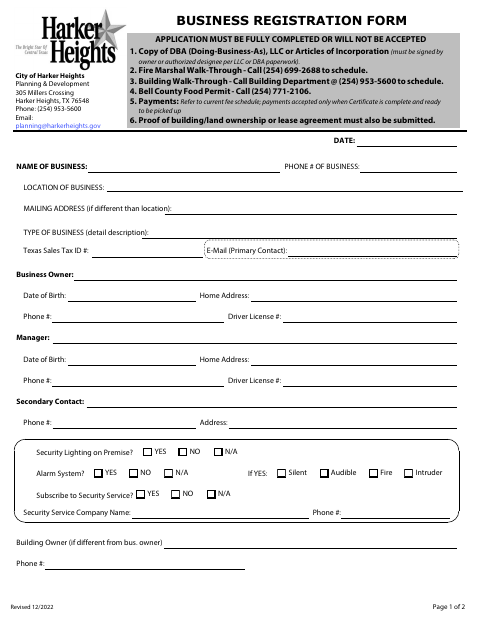
The packet describes which small businesses may operate as incidental uses of a dwelling and lists conditions such as limits on signs, traffic, parking, and outside storage. It also includes a business registration form with business details and a sworn statement, plus a space to describe the home occupation. Applicants should complete the applicable information and submit it to Planning & Development; the packet says occupations not expressly permitted or prohibited may require formal review.
Who needs it
Residents planning to operate a small business from their home can use this packet to describe the occupation and review the city’s requirements.
Why it needs a notary
The Business Registration Form carries a sworn-and-subscribed jurat; the applicant signs its statement before a notary after affirming the information is true and correct.
How to get this notarized
- 1
Download The Packet
Download the Home Occupation packet from Harker Heights and review the application and guidelines.
- 2
Complete The Forms
Describe the proposed home occupation and fill in the applicable business registration details.
- 3
Book An Online Notary
Schedule a commissioned online notary for the sworn Business Registration Form statement.
- 4
Sign On Video
Show identification and sign the sworn statement during the online notarization.
- 5
Submit To The City
Submit the completed packet and any required supporting documents to Harker Heights Planning & Development.
Preview the form
The blank PDF straight from Harker Heights. Look it over, then upload your filled copy to start the notary session.

You’ll need ID and a webcam.
A licensed online notary will join you on video, verify your government-issued ID, witness your signature, and apply their seal. You’ll receive the notarized PDF by email when the session ends.
Frequently asked questions
- How do I complete the home occupation packet?
- Describe the proposed home occupation, complete the applicable business registration information, and review the listed conditions. The applicant signs the sworn business registration statement before a notary.
- Do I need to sign the business registration form before a notary?
- The form includes a sworn-and-subscribed jurat for the applicant’s statement that the information is true and correct. Sign that statement before a notary.
- Can any business operate as a home occupation?
- No. The packet lists occupations included and excluded and explains that an occupation not expressly permitted or prohibited may be submitted for formal review. Confirm with the city if unsure.
- Can I use an online notary for the sworn statement?
- Texas has authorized remote online notarization since 2018. You may book a commissioned online notary to notarize the sworn statement by video; check the city’s submission preferences if needed.