
Weston, TX · Collin County
Tree Preservation Application
This two-page form lets a property owner apply for a tree permit and disclose possible conflicts of interest when seeking city action or doing business with Weston.
- licensed online notary
- ~15 min average
- Notarized PDF emailed
What you’ll need
- Government-issued photo ID
- Webcam-enabled device (laptop or phone)
- This form, ready to upload as a PDF
What this form is
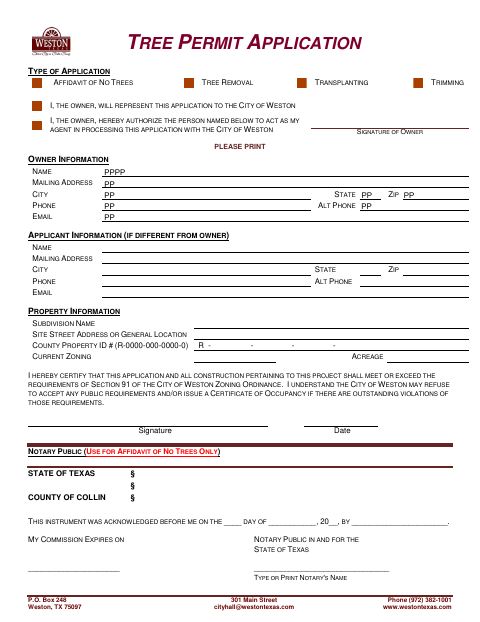
Use this application to identify the property and select an affidavit of no trees, tree removal, transplanting, or trimming. The owner signs to represent the application or authorize an agent, and certifies that the project will meet the stated zoning requirements. The form also asks about relationships that could create conflicts of interest involving city officials or board members; the person completing that section provides details if applicable.
Who needs it
Property owners applying for a tree permit in Weston, or their authorized representatives, complete the application and the applicable conflict-of-interest disclosure.
Why it needs a notary
The form has acknowledgment blocks for the owner’s affidavit of no trees and the person completing the conflict statement; the applicable signer signs before the notary.
How to get this notarized
- 1
Download the Application
Download the Tree Preservation Application from the City of Weston.
- 2
Complete the Form
Enter owner, applicant, and property information; select the applicable tree application type and complete the conflict-of-interest section.
- 3
Book an Online Notary
Arrange an online notary session for the acknowledgment block that applies to your completed form.
- 4
Sign on Video
Follow the notary’s instructions and sign the applicable statement during the video session.
- 5
Submit to the City
Send the completed application to the City of Weston using its submission instructions.
Preview the form
The blank PDF straight from Weston. Look it over, then upload your filled copy to start the notary session.

You’ll need ID and a webcam.
A licensed online notary will join you on video, verify your government-issued ID, witness your signature, and apply their seal. You’ll receive the notarized PDF by email when the session ends.
Frequently asked questions
- Which parts of the application need notarization?
- The owner’s acknowledgment is marked for use with the Affidavit of No Trees only. The conflict-of-interest statement also has an acknowledgment block for the person completing it.
- Do I need to complete the conflict-of-interest statement?
- The form asks about financial, business, or personal relationships involving listed property-related parties and city officials or board members. If yes, it asks for details.
- How do I get this form notarized online?
- Texas has authorized remote online notarization since 2018 under Government Code Chapter 406, Subchapter C. Book with a commissioned online notary, sign during the video session, and confirm with the city if unsure.
- Can an out-of-state notary take the acknowledgment?
- Texas recognizes acknowledgments taken by notaries of other states under CPRC §121.001. Confirm with the city if unsure whether it will accept your completed form.