
Friendswood, TX · Galveston County
Final Waiver of Lien
This form lets a general contractor waive lien claims up to a stated amount for work, labor, materials, equipment, or services billed to the City of Friendswood.
- licensed online notary
- ~15 min average
- Notarized PDF emailed
What you’ll need
- Government-issued photo ID
- Webcam-enabled device (laptop or phone)
- This form, ready to upload as a PDF
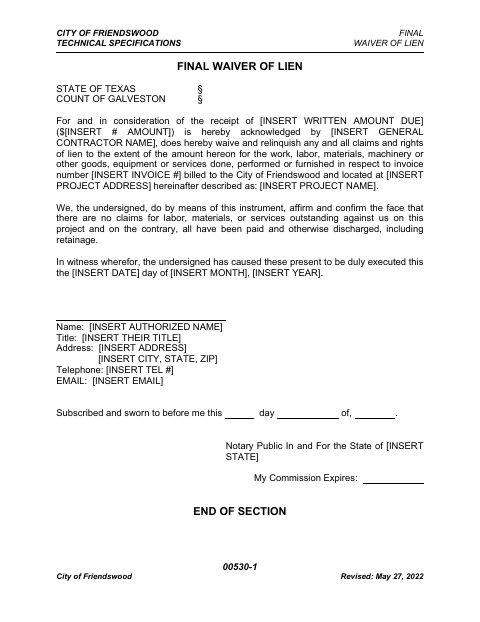
What this form is
The general contractor identifies the amount received, invoice, project address, project name, and authorized signer, then waives lien claims up to that amount. The signer also affirms that claims for labor, materials, and services on the project have been paid or discharged, including retainage. Use the form when providing a final waiver for work or supplies billed to the city.
Who needs it
A general contractor completing work, labor, or supply services billed to the City of Friendswood uses this form to waive lien claims up to the stated amount.
Why it needs a notary
The form has a subscribed-and-sworn jurat; the authorized representative named on it signs and swears to the waiver before a notary.
How to get this notarized
- 1
Download the Form
Get the Final Waiver of Lien from the City of Friendswood.
- 2
Fill In the Waiver
Enter the amount, contractor and project details, invoice number, and authorized signer's information.
- 3
Book an Online Notary
Schedule a session with a commissioned online notary.
- 4
Sign on Video
Sign and swear to the waiver during the online notarization session.
- 5
Submit to the City
Send the completed, notarized waiver to the City of Friendswood.
Preview the form
The blank PDF straight from Friendswood. Look it over, then upload your filled copy to start the notary session.

You’ll need ID and a webcam.
A licensed online notary will join you on video, verify your government-issued ID, witness your signature, and apply their seal. You’ll receive the notarized PDF by email when the session ends.
Frequently asked questions
- How do I notarize this final waiver of lien online?
- Complete the waiver details, book a commissioned online notary, and sign during the video session. The form includes a subscribed-and-sworn jurat for the signer.
- Do I need to sign this waiver in front of a notary?
- Yes. The form includes a subscribed-and-sworn jurat, so the authorized signer must sign and swear to the waiver before a notary.
- Can I use an online notary for this Texas form?
- Texas has authorized remote online notarization since 2018 under Government Code Chapter 406, Subchapter C. Ask the city about its submission requirements; confirm with the city if unsure.
- What information does the waiver ask me to provide?
- The form asks for the amount received, general contractor name, invoice number, project address and name, execution date, and the authorized signer's contact and title details.