
Wichita Falls, TX · Wichita County
Affidavit of Licensed Contractors
This one-page affidavit lets a licensed contractor identify employees authorized to pull work permits on the contractor’s or company’s behalf and state responsibility for their permitted work.
- licensed online notary
- ~15 min average
- Notarized PDF emailed
What you’ll need
- Government-issued photo ID
- Webcam-enabled device (laptop or phone)
- This form, ready to upload as a PDF
What this form is
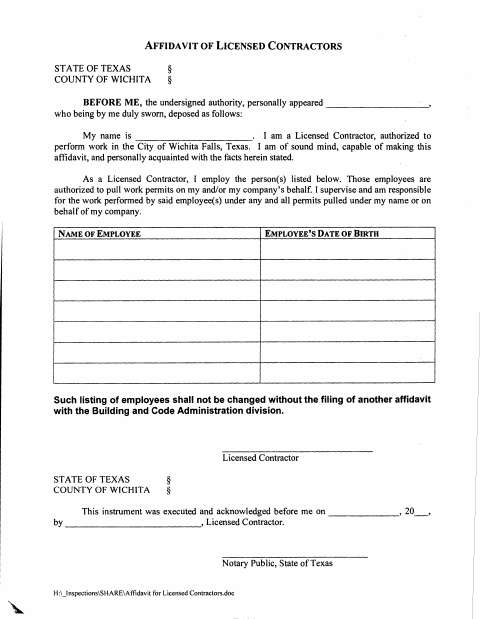
This affidavit records the licensed contractor’s identity and the employees authorized to pull work permits under the contractor’s or company’s name. It also states that the contractor supervises and is responsible for work performed under those permits. The form says the employee listing cannot be changed without filing another affidavit with the Building and Code Administration division, so contractors use it when establishing or updating their authorized employee list.
Who needs it
A licensed contractor authorized to perform work in Wichita Falls who wants named employees to pull permits on the contractor’s or company’s behalf needs this affidavit.
Why it needs a notary
The form contains an acknowledgment block and sworn-statement language; the licensed contractor named in it appears before a notary to execute it.
How to get this notarized
- 1
Download The Affidavit
Get the Affidavit of Licensed Contractors from the City of Wichita Falls.
- 2
Identify Authorized Employees
Complete the contractor information and list the employees authorized to pull work permits.
- 3
Book An Online Notary
Schedule a remote session with a commissioned online notary.
- 4
Sign On Video
Appear before the notary by video and complete the form’s acknowledgment.
- 5
Submit To The City
File the notarized affidavit with the Building and Code Administration division.
Preview the form
The blank PDF straight from Wichita Falls. Look it over, then upload your filled copy to start the notary session.

You’ll need ID and a webcam.
A licensed online notary will join you on video, verify your government-issued ID, witness your signature, and apply their seal. You’ll receive the notarized PDF by email when the session ends.
Frequently asked questions
- How do I complete and file this affidavit?
- Identify the employees authorized to pull work permits, sign before a notary, and file the affidavit with the Building and Code Administration division. The form says another affidavit must be filed to change the employee listing.
- Do I need to sign this affidavit in front of a notary?
- Yes. The form includes an acknowledgment block and sworn-statement language. Texas has authorized remote online notarization since 2018 under Government Code Chapter 406, Subchapter C; a commissioned online notary can notarize remotely.
- Who can be listed as authorized employees?
- The affidavit is for a licensed contractor to list employees authorized to pull work permits on the contractor’s or company’s behalf. It also states that the contractor supervises and is responsible for work under those permits.
- Can I use an out-of-state notary?
- Texas recognizes acknowledgments taken by notaries of other states under Civil Practice and Remedies Code §121.001. For acceptance of this particular form, confirm with the city if unsure.
Other forms in Wichita Falls
Mutual Perpetual Access Easement Agreement
Wichita Falls
Dealers of Precious Metals Permit Application
Wichita Falls
Off-Street Parking Agreement
Wichita Falls
Petition Requesting Annexation
Wichita Falls
Volunteer Release of Liability Waiver
Wichita Falls
Volunteer Release of Liability Waiver for Minor
Wichita Falls