
Office of the Lieutenant Governor, VI · St. Thomas
Notary Public Oath of Office
This oath form records an applicant’s promise to support applicable laws and faithfully perform notary duties, and is filed with the Office of the Lieutenant Governor’s Notaries Public Division.
- licensed online notary
- ~15 min average
- Notarized PDF emailed
What you’ll need
- Government-issued photo ID
- Webcam-enabled device (laptop or phone)
- This form, ready to upload as a PDF
What this form is
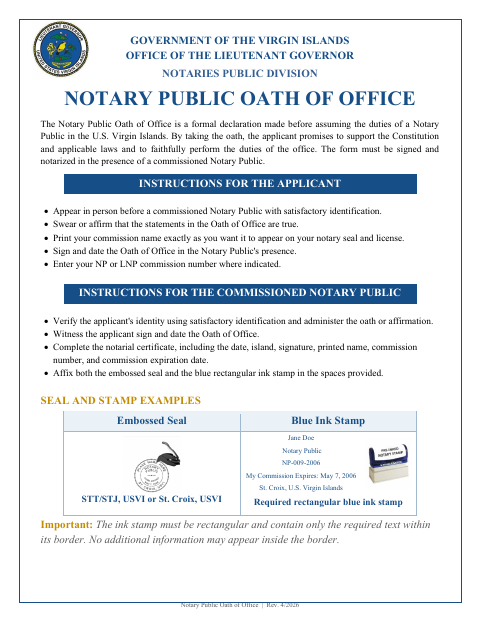
The Notary Public Oath of Office is a formal declaration for applicants preparing to assume the duties of a Notary Public in the U.S. Virgin Islands. The Office of the Lieutenant Governor’s instructions say the applicant must swear or affirm the oath, sign and date it before a commissioned notary, and provide commission details. The notarizing official completes the certificate and the required seal and stamp fields.
Who needs it
Applicants taking office as a Notary Public in the U.S. Virgin Islands use this form to make and notarize their oath before assuming their duties.
How to get this notarized
- 1
Download the Oath Form
Get the Notary Public Oath of Office from the Office of the Lieutenant Governor’s Notaries Public Division.
- 2
Complete the Applicant Details
Print your commission name as it should appear on your seal and license, and enter your NP or LNP commission number where indicated.
- 3
Book an Online Notary
Check with the receiving agency whether it accepts an online notarization before booking; the form instructs applicants to appear in person before a commissioned notary.
- 4
Take and Sign the Oath
Swear or affirm the oath and sign and date it in the notary’s presence, following the form’s instructions.
- 5
Submit the Completed Form
Ensure the notary completes the certificate and required seal and stamp fields, then submit the form as directed by the Office of the Lieutenant Governor.
Preview the form
The blank PDF straight from Office of the Lieutenant Governor. Look it over, then upload your filled copy to start the notary session.

You’ll need ID and a webcam.
A licensed online notary will join you on video, verify your government-issued ID, witness your signature, and apply their seal. You’ll receive the notarized PDF by email when the session ends.
Frequently asked questions
- How do I complete the Notary Public Oath of Office?
- Follow the form instructions: bring satisfactory identification, swear or affirm the oath, and sign and date it before a commissioned notary. The notary completes the certificate and required seal and stamp fields.
- Do I need to sign the oath in front of a notary?
- Yes. The form instructs applicants to sign and date the oath in a commissioned notary’s presence, and its certificate records that it was sworn or affirmed before the notary.
- Can I use an online notary for this oath?
- The form instructs applicants to appear in person before a commissioned notary. The U.S. Virgin Islands has no identified remote-online-notarization statute for its own notaries, and acceptance of an outside online notarization is not confirmed; confirm with the receiving agency or the Recorder of Deeds if unsure.
- What should the notary complete on the form?
- The instructions ask the notary to enter the date, island, signature, printed name, commission number, and commission expiration date, and to affix the embossed seal and blue rectangular ink stamp.
Other forms in Office of the Lieutenant Governor
Affidavit of Lost Instrument
Office of the Lieutenant Governor
Affidavit of Lost Instrument (Power of Attorney)
Office of the Lieutenant Governor
Affidavit of Translation
Office of the Lieutenant Governor
Affidavit Payment of Certain Debts Without Administration
Office of the Lieutenant Governor
Appointment of Insurance Producer
Office of the Lieutenant Governor
Appointment of Solicitor
Office of the Lieutenant Governor