
Office of the Lieutenant Governor, VI · St. Thomas
Third Party Administrator Renewal Application
This application requests renewal of a Third Party Administrator license from the U.S. Virgin Islands Division of Banking, Insurance and Financial Regulation.
- licensed online notary
- ~15 min average
- Notarized PDF emailed
What you’ll need
- Government-issued photo ID
- Webcam-enabled device (laptop or phone)
- This form, ready to upload as a PDF
What this form is
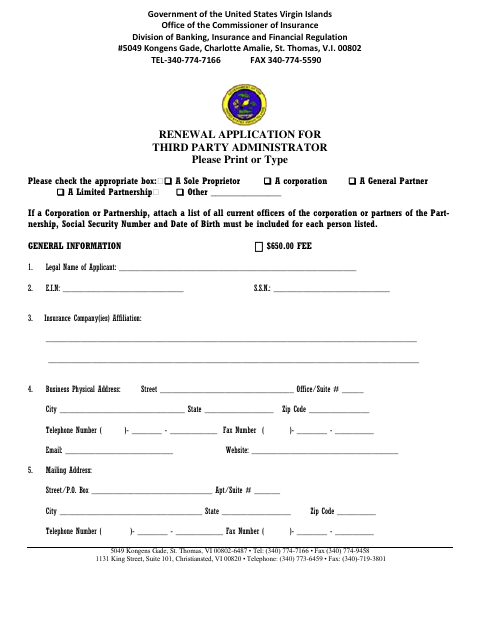
The four-page application collects the applicant’s business details, insurance affiliations, licensing activities, background disclosures, and information about required insurance, financial security, and fiduciary accounts. A Third Party Administrator applicant uses it to request license renewal from the Division of Banking, Insurance and Financial Regulation. The form also includes a certification, signed by an authorized officer or director, affirming the information and the applicant’s compliance.
Who needs it
A Third Party Administrator seeking to renew a license with the U.S. Virgin Islands Division of Banking, Insurance and Financial Regulation needs this application.
Why it needs a notary
The certification page has a sworn statement and subscribed-and-sworn jurat; the authorized officer or director named in the certification signs and swears before the notary.
How to get this notarized
- 1
Download The Application
Get the Third Party Administrator Renewal Application from the Office of the Lieutenant Governor.
- 2
Complete The Application
Fill in the applicant, business, licensing, background, financial responsibility, and fiduciary account information, and gather requested attachments.
- 3
Book An Online Notary
Arrange a remote session with a commissioned online notary for the certification’s sworn statement.
- 4
Sign On Video
The authorized officer or director signs and swears to the certification before the notary during the video session.
- 5
Submit To The Agency
Submit the completed application and supporting documents to the Division of Banking, Insurance and Financial Regulation, following its instructions.
Preview the form
The blank PDF straight from Office of the Lieutenant Governor. Look it over, then upload your filled copy to start the notary session.

You’ll need ID and a webcam.
A licensed online notary will join you on video, verify your government-issued ID, witness your signature, and apply their seal. You’ll receive the notarized PDF by email when the session ends.
Frequently asked questions
- How do I complete the notarized certification?
- Complete the application and have the authorized officer or director sign and swear to the certification before a commissioned online notary. Follow the receiving agency’s instructions for submitting the application.
- Do I need to sign the certification in front of a notary?
- Yes. The certification page includes a sworn statement and a subscribed-and-sworn jurat for the authorized officer or director.
- Can I use an online notary for this application?
- The form requires a notarized sworn statement. Ask the receiving agency whether it accepts an act performed by a commissioned online notary; confirm with the receiving agency or the Recorder of Deeds if unsure.
- What supporting information does the application request?
- The form requests business and licensing details, background disclosures, errors and omissions coverage, financial security information, and details about fiduciary accounts. It also calls for specified supporting documents.
Other forms in Office of the Lieutenant Governor
Affidavit of Lost Instrument
Office of the Lieutenant Governor
Affidavit of Lost Instrument (Power of Attorney)
Office of the Lieutenant Governor
Affidavit of Translation
Office of the Lieutenant Governor
Affidavit Payment of Certain Debts Without Administration
Office of the Lieutenant Governor
Appointment of Insurance Producer
Office of the Lieutenant Governor
Appointment of Solicitor
Office of the Lieutenant Governor