
Pleasant View, UT · Weber County
Solicitor Certificate Application
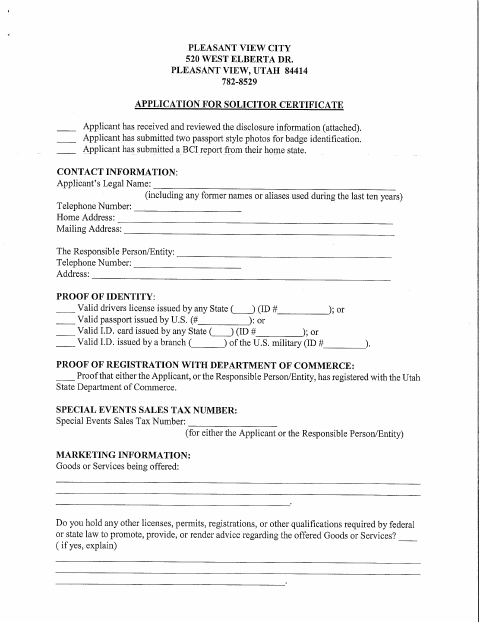
Pleasant View’s Solicitor Certificate Application collects an applicant’s identity, contact, background-check, registration, and sales-tax information for people seeking permission to solicit in the city.
At a glance
- Issued by
- City of Pleasant View · Pleasant View, Weber County, Utah
- Notarization
- Required: sign this form in front of a notary before filing it.
- Official source
- pleasantviewut.gov
- Blank form
- Download the PDF
- Catalogued
- Machine-readable
- JSON record · about the forms index
- licensed online notary
- ~15 min average
- Notarized PDF emailed
What you’ll need
- Government-issued photo ID
- Webcam-enabled device (laptop or phone)
- This form, ready to upload as a PDF
What this form is
Use this six-page application to request a solicitor certificate from Pleasant View City. It asks for identity and business details, proof of registration, background-check materials, answers about possible disqualifying status, and a $40 fee. The form also includes written disclosures, solicitor rules, and a liability-release section authorizing the city police department to conduct a background check. The release contains the notarial oath; complete it as directed before submitting the application to the city.
Who needs it
People applying to solicit in Pleasant View should complete this application and provide the requested identity, registration, background-check, and fee materials.
Why it needs a notary
The liability release carries a subscribed-and-sworn jurat; the applicant signing the release must swear to it before the notary.
How to get this notarized
- 1
Download the Application
Get the Solicitor Certificate Application from Pleasant View City.
- 2
Complete the Form
Fill in applicant and responsible-entity details, answer the background questions, and gather the required identity, registration, and background-check materials.
- 3
Book an Online Notary
Schedule an appointment with a commissioned online notary for the liability release.
- 4
Sign on Video
Sign and swear to the liability release during the online notary appointment.
- 5
Submit to the City
Submit the completed application, notarized release, required materials, and $40 fee to Pleasant View City.
Preview the form
The blank PDF straight from Pleasant View. Look it over, then upload your filled copy to start the notary session.

You’ll need ID and a webcam.
A licensed online notary will join you on video, verify your government-issued ID, witness your signature, and apply their seal. You’ll receive the notarized PDF by email when the session ends.
Frequently asked questions
- How do I get the liability release notarized?
- Complete the release as directed, but wait to sign until you meet with a commissioned online notary. The notary administers the oath and completes the subscribed-and-sworn jurat.
- Do I need to notarize the full application?
- The form’s notarial block appears in the liability release, not as a general notary block for every application section. The applicant signs and swears to the release before the notary.
- Can I sign with a commissioned online notary?
- Utah authorizes remote online notarization for its own notaries with remote notary certification. Confirm with Pleasant View City that it accepts the remotely notarized release before submitting your application.
- Where do I submit the completed application?
- The form identifies Pleasant View City as the issuing authority. Follow the city’s instructions for submitting the completed application and required materials; confirm with the city or county recorder if unsure.