
University Place, WA · Pierce County
Public Notice Signs Affidavit of Posting
This affidavit records when an applicant or applicant’s agent posted a required project sign and is submitted to University Place Planning and Development Services.
- licensed online notary
- ~15 min average
- Notarized PDF emailed
What you’ll need
- Government-issued photo ID
- Webcam-enabled device (laptop or phone)
- This form, ready to upload as a PDF
What this form is
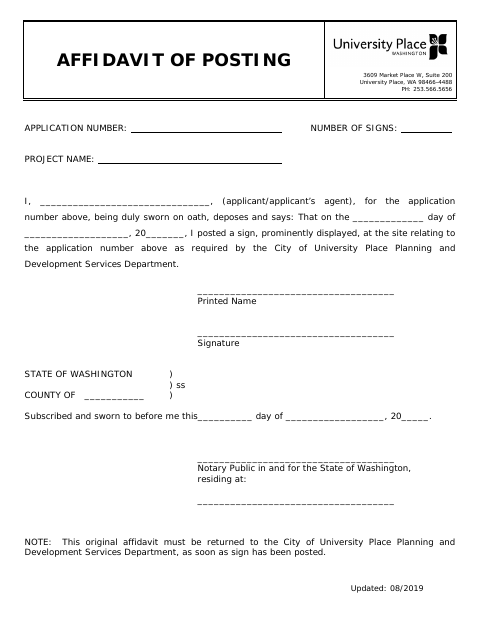
Use this form to provide the application number, project name, number of signs, posting date, and the name and signature of the applicant or agent who posted the sign. The signer swears that a sign was prominently displayed at the project site as required by the City of University Place Planning and Development Services Department. The form instructs that the original affidavit be returned to the department as soon as the sign has been posted.
Who needs it
An applicant or the applicant’s agent who posted a prominently displayed sign at a project site for a City of University Place application needs to complete this affidavit.
Why it needs a notary
The form has a state jurat: the applicant or agent signs and swears to the posting statement before a notary public.
How to get this notarized
- 1
Download the Form
Get the Public Notice Signs Affidavit of Posting from the City of University Place.
- 2
Complete the Form
Enter the application number, number of signs, project name, posting date, and applicant or agent details.
- 3
Book an Online Notary
Schedule a remote online notarization with a commissioned online notary.
- 4
Sign on Video
Sign and swear to the posting statement during the notary video appointment.
- 5
Submit to the City
Return the original affidavit to University Place Planning and Development Services as soon as the sign has been posted.
Preview the form
The blank PDF straight from University Place. Look it over, then upload your filled copy to start the notary session.

You’ll need ID and a webcam.
A licensed online notary will join you on video, verify your government-issued ID, witness your signature, and apply their seal. You’ll receive the notarized PDF by email when the session ends.
Frequently asked questions
- How do I notarize the affidavit of posting?
- Complete the form details, then sign and swear to the statement before a commissioned online notary during a video appointment. Return the original affidavit to the city as instructed.
- Do I need to sign the affidavit in front of a notary?
- Yes. The form includes a subscribed-and-sworn jurat, so the applicant or applicant’s agent must sign and swear to the statement before a notary.
- Can I use an online notary for this form?
- Washington authorizes its notaries to perform remote online notarizations. Confirm with the city or town if unsure whether it will accept an affidavit notarized online.
- When should I return the original affidavit?
- The form says the original affidavit must be returned to University Place Planning and Development Services as soon as the sign has been posted.
Other forms in University Place
Aquifer Title Notification
University Place
Boundary Line Adjustment And Lot Combination Application
University Place
Fish and Wildlife Habitat Area Notice
University Place
Flood Hazard Area Notice
University Place
Landscape Improvement Maintenance Agreement Restrictive Covenant (Corporate Form)
University Place
Landscape Improvement Maintenance Agreement and Restrictive Covenant
University Place