
Osseo, WI · Trempealeau County
Renewal Application for Adult-Oriented License
This two-page renewal application is for individuals and business entities seeking to renew an adult-oriented license from the City of Osseo.
At a glance
- Issued by
- City of Osseo · Osseo, Trempealeau County, Wisconsin
- Notarization
- Required: sign this form in front of a notary before filing it.
- Official source
- storage.googleapis.com
- Blank form
- Download the PDF
- Catalogued
- Machine-readable
- JSON record · about the forms index
- licensed online notary
- ~15 min average
- Notarized PDF emailed
What you’ll need
- Government-issued photo ID
- Webcam-enabled device (laptop or phone)
- This form, ready to upload as a PDF
What this form is
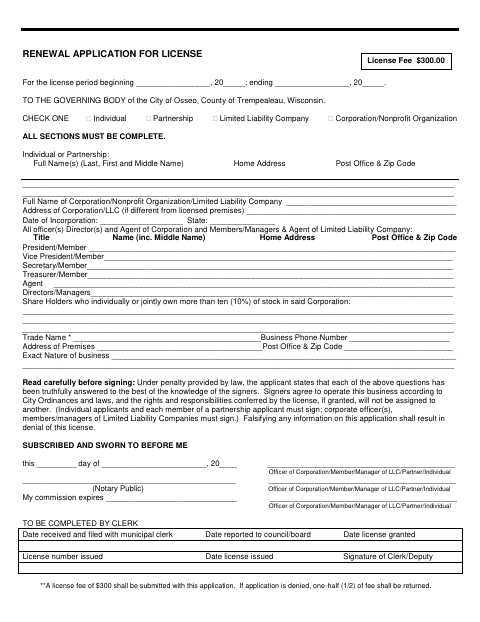
Applicants use this form to provide business details, identify owners and responsible officers or members, and affirm that the application is truthful. The form is addressed to the City of Osseo governing body and must be completed in all sections. Applicants sign under oath, and the application states that a $300 license fee must be submitted; the form also explains that half the fee is returned if the application is denied.
Who needs it
Individuals, partnerships, limited liability companies, and corporations or nonprofit organizations applying to renew an adult-oriented license in Osseo need this form.
Why it needs a notary
The form has a subscribed-and-sworn-before-me jurat; the individual applicant or applicable partners, officers, members, or managers sign before the notary.
How to get this notarized
- 1
Download The Application
Get the City of Osseo renewal application for an adult-oriented license.
- 2
Complete Every Section
Select the applicant type and fill in the required applicant, business, and responsible-person information.
- 3
Book An Online Notary
Arrange a remote notarization session with a commissioned online notary.
- 4
Sign On Video
Sign the application during the video session before the notary completes the jurat.
- 5
Submit To The City
Send the completed application to the City of Osseo and include the $300 license fee stated on the form.
Preview the form
The blank PDF straight from Osseo. Look it over, then upload your filled copy to start the notary session.

You’ll need ID and a webcam.
A licensed online notary will join you on video, verify your government-issued ID, witness your signature, and apply their seal. You’ll receive the notarized PDF by email when the session ends.
Frequently asked questions
- How do I get the Osseo adult-oriented license renewal application notarized online?
- Complete the application, then book a session with a commissioned online notary. Sign the application during the video session, and submit it to the City of Osseo with the required fee.
- Do I need to sign the application in front of a notary?
- Yes. The form includes a subscribed-and-sworn-before-me jurat, so the applicant or applicable business signers must sign before a notary.
- Can a commissioned online notary notarize this application?
- Wisconsin authorizes remote online notarization under Wis. Stat. §140.145, with exclusions for wills, trusts, powers of attorney, and marital property agreements. Confirm with the city or village if unsure.
- What should I submit with the completed application?
- The form states that a $300 license fee must be submitted with the application. It does not specify other submission instructions, so check with the City of Osseo if you need guidance.