
Cheyenne, WY · Laramie County
Liquor License Application Affidavit and Authorization
This one-page affidavit confirms an applicant's authority to sign a Cheyenne liquor license or permit application and is filed by the applicant with the City's licensing materials.
At a glance
- Issued by
- City of Cheyenne · Cheyenne, Laramie County, Wyoming
- Notarization
- Required: sign this form in front of a notary before filing it.
- Official source
- cheyennecity.org
- Blank form
- Download the PDF
- Catalogued
- Machine-readable
- JSON record · about the forms index
- licensed online notary
- ~15 min average
- Notarized PDF emailed
What you’ll need
- Government-issued photo ID
- Webcam-enabled device (laptop or phone)
- This form, ready to upload as a PDF
What this form is
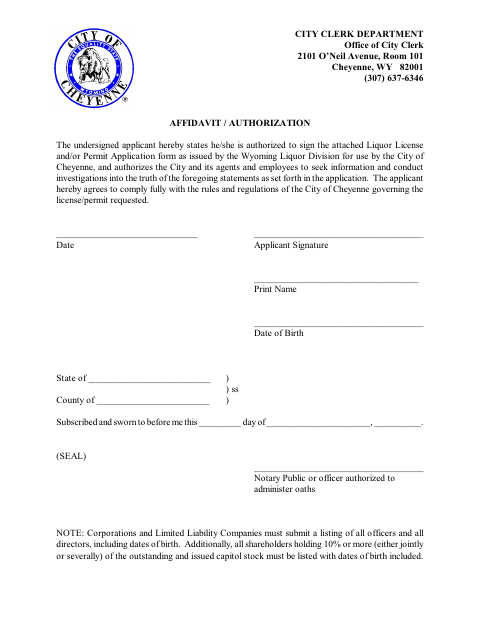
The affidavit states that the applicant is authorized to sign the attached Wyoming Liquor Division application for use by the City of Cheyenne. It also authorizes the City and its agents to investigate the statements in the application and commits the applicant to follow City rules for the requested license or permit. Corporations and limited liability companies must also provide the officer, director, and qualifying shareholder information specified on the form.
Who needs it
An applicant submitting a liquor license or permit application to the City of Cheyenne uses this affidavit to confirm signing authority and authorize an investigation.
Why it needs a notary
The form has a subscribed-and-sworn jurat, and the applicant signs the affidavit before a notary public or officer authorized to administer oaths.
How to get this notarized
- 1
Download the Affidavit
Get the City of Cheyenne's Liquor License Application Affidavit and Authorization form.
- 2
Fill In Applicant Details
Complete the applicant information and prepare any company officer, director, and qualifying shareholder details required by the form.
- 3
Book an Online Notary
Arrange a remote notarization with a commissioned online notary.
- 4
Sign During the Notarization
Sign the affidavit before the notary, who completes the subscribed-and-sworn section.
- 5
Submit to the City
Send the notarized affidavit with the liquor license or permit application to the City of Cheyenne.
Preview the form
The blank PDF straight from Cheyenne. Look it over, then upload your filled copy to start the notary session.

You’ll need ID and a webcam.
A licensed online notary will join you on video, verify your government-issued ID, witness your signature, and apply their seal. You’ll receive the notarized PDF by email when the session ends.
Frequently asked questions
- How do I complete this affidavit?
- Enter the requested applicant information, sign before a notary or authorized officer, and submit the completed affidavit with the liquor license or permit application to the City.
- Do I need to sign the affidavit in front of a notary?
- Yes. The form includes a subscribed-and-sworn jurat, so the applicant must sign before a notary public or an officer authorized to administer oaths.
- Can I complete the notarization online?
- Wyoming authorizes remote online and remote ink notarization. A commissioned online notary can conduct a remote online notarization; confirm with the city if unsure whether it will accept the notarized form.
- What extra information must a company provide?
- The form says corporations and limited liability companies must submit a list of all officers and directors, including dates of birth, plus shareholders holding 10% or more and their dates of birth.