
Opelika, AL · Lee County
Conditional Use Application
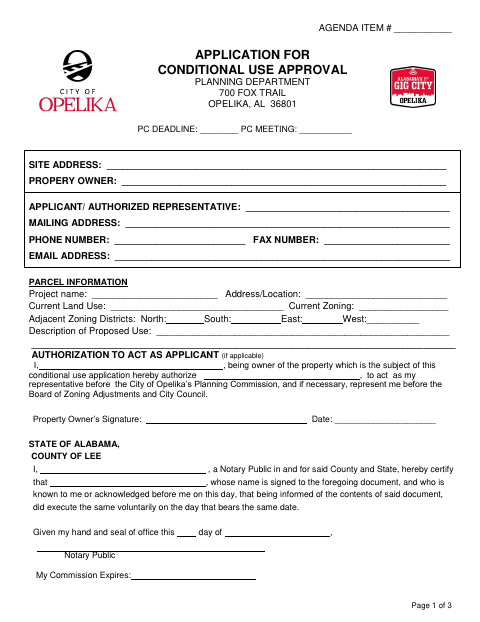
This three-page application requests conditional use approval and is filed by a property owner or authorized applicant seeking to use a property in a way that requires City of Opelika Planning Commission review.
- licensed online notary
- ~15 min average
- Notarized PDF emailed
What you’ll need
- Government-issued photo ID
- Webcam-enabled device (laptop or phone)
- This form, ready to upload as a PDF
What this form is
Use this application to request approval for a proposed conditional use at a specific property in Opelika. It asks for property and project details, responses about the proposed use and its effects, and supporting materials including a current deed and site plan copies. The form says the property owner's authorization for a representative to act as applicant must be signed and notarized, if applicable, and lists a $125 application fee and monthly submission deadline.
Who needs it
A property owner or the owner's authorized representative needs this form to request conditional use approval from the Opelika Planning Commission.
Why it needs a notary
The page-one acknowledgment is for the property owner's signature on the authorization to act as applicant; the owner signs before the notary when that authorization applies.
How to get this notarized
- 1
Download the Application
Get the Conditional Use Application from the City of Opelika Planning Department.
- 2
Complete the Form
Enter the property, applicant, project, and proposed-use details and answer the review questions.
- 3
Book an Online Notary
If the owner authorizes a representative, arrange notarization of the owner's authorization.
- 4
Sign on Video
The property owner signs the authorization in front of a commissioned online notary.
- 5
Submit to the City
Submit the completed application with the deed copy, required site plan copies, and application fee.
Preview the form
The blank PDF straight from Opelika. Look it over, then upload your filled copy to start the notary session.

You’ll need ID and a webcam.
A licensed online notary will join you on video, verify your government-issued ID, witness your signature, and apply their seal. You’ll receive the notarized PDF by email when the session ends.
Frequently asked questions
- How do I notarize the authorization to act as applicant?
- The property owner signs the authorization before a commissioned online notary. Complete the application and have the notarized authorization ready with the other required materials.
- Do I need to notarize the entire application?
- The form says the property owner's authorization for a representative to act as applicant must be signed and notarized, if applicable. It does not identify the other application signatures as notarized.
- Can I use a commissioned online notary for this form?
- Alabama's remote-notarization authorization applies to notaries physically located in Alabama. An acknowledgment taken elsewhere may have the same effect if it follows the law where it is taken and bears the officer's official seal. Confirm acceptance with the city or town if unsure.
- What else must I submit with the application?
- The form lists a copy of the current deed, 26 copies of the site plan in specified sizes, and a $125 application fee. It also says applications are due the first Tuesday of each month.
Conditional Use Application in other Alabama cities
Each city publishes its own version of this form. Pick the city where you’re filing.