
Opelika, AL · Lee County
Home Occupation Permit Application
This application asks residents to describe a business operated from their home and provide information for Opelika’s Planning Department to review before granting a home occupation permit.
- licensed online notary
- ~15 min average
- Notarized PDF emailed
What you’ll need
- Government-issued photo ID
- Webcam-enabled device (laptop or phone)
- This form, ready to upload as a PDF
What this form is
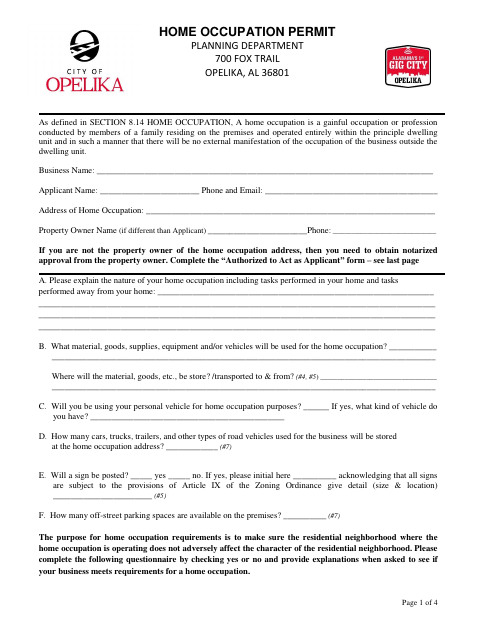
Use this application to request permission to operate a home occupation at a residential property in Opelika. It asks about the business, its activities, employees, vehicles, signs, parking, and possible effects on the neighborhood. Applicants must also provide a plot plan showing the residence and accessory buildings in relation to property lines. The form includes an authorization for the property owner to approve a tenant or resident’s application when the applicant is not the owner.
Who needs it
Residents applying to operate a home-based business in Opelika need this form, and a non-owner applicant must obtain the property owner’s notarized approval.
Why it needs a notary
The final-page acknowledgment is for the property owner to sign before a notary; the applicant’s separate certification does not include a notary block.
How to get this notarized
- 1
Download the Application
Get the Home Occupation Permit Application from Opelika’s Planning Department.
- 2
Complete the Application
Answer the business and property questions, and prepare the plot plan and floor plan listed in the submittal requirements.
- 3
Book an Online Notary
If you are not the property owner, arrange an online notarization for the owner’s authorization.
- 4
Sign on Video
The property owner signs the acknowledgment during the online notary session.
- 5
Submit to the City
Send the completed application, required plans, and notarized owner authorization to the Planning Department.
Preview the form
The blank PDF straight from Opelika. Look it over, then upload your filled copy to start the notary session.

You’ll need ID and a webcam.
A licensed online notary will join you on video, verify your government-issued ID, witness your signature, and apply their seal. You’ll receive the notarized PDF by email when the session ends.
Frequently asked questions
- How do I get the property owner’s authorization notarized?
- Complete the authorization section, then have the property owner sign its acknowledgment before a commissioned online notary. Submit the notarized authorization with the application.
- Do I need notarization if I own the home?
- The form requests notarized property-owner approval when the applicant is not the property owner. It does not specify a notarization requirement for an owner applying for their own property.
- Can I notarize the owner’s signature online?
- A commissioned online notary can take an acknowledgment by two-way audio-video communication. An acknowledgment taken outside Alabama may have the same effect as one taken inside Alabama when it follows the law where it was taken and bears the officer’s official seal.
- What supporting materials does the application require?
- The application lists a plot plan showing the residence and accessory buildings in relation to property lines. It also calls for a floor plan showing room locations, sizes, and areas.
- Where do I submit the completed application?
- The form identifies the Planning Department and lists its address as 700 Fox Trail, Opelika, AL 36801. Confirm with the city or town if unsure.