
Opelika, AL · Lee County
Sign Permit Application
This four-page application collects project, property, and sign details for people seeking a City of Opelika sign permit, and includes notarized sections for property-owner authorization and notice of commencement.
- licensed online notary
- ~15 min average
- Notarized PDF emailed
What you’ll need
- Government-issued photo ID
- Webcam-enabled device (laptop or phone)
- This form, ready to upload as a PDF
What this form is
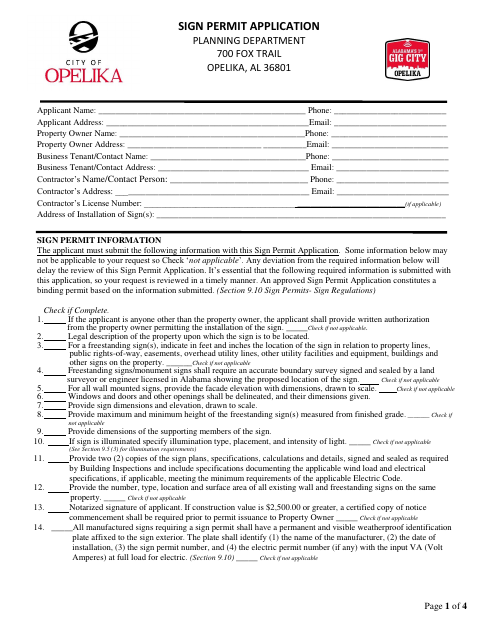
Use this application to request approval to install signs and provide the project details and supporting materials listed on the form, such as sign plans, dimensions, and property information. If the applicant is not the property owner, the form includes written authorization for the applicant to act for the owner. It also includes a notice of commencement section and states that a certified copy is required before permit issuance when construction value is $2,500 or greater.
Who needs it
Applicants seeking a sign permit in Opelika should complete this form, including property owners and representatives authorized to apply on an owner’s behalf.
Why it needs a notary
The form has acknowledgment blocks for the property owner’s authorization and notice of commencement; the person signing each applicable section signs before the notary.
How to get this notarized
- 1
Download the Application
Get the four-page Sign Permit Application from the City of Opelika.
- 2
Fill In the Project Details
Complete the applicant, owner, contractor, installation, and applicable sign-information fields.
- 3
Book an Online Notary
Arrange a session with a commissioned online notary for the applicable notarized section.
- 4
Sign on Video
Sign the applicable section during the online notary session and follow the notary’s instructions.
- 5
Submit to the City
Include requested plans and supporting materials, then submit the completed application to the City of Opelika.
Preview the form
The blank PDF straight from Opelika. Look it over, then upload your filled copy to start the notary session.

You’ll need ID and a webcam.
A licensed online notary will join you on video, verify your government-issued ID, witness your signature, and apply their seal. You’ll receive the notarized PDF by email when the session ends.
Frequently asked questions
- How do I complete the sign permit application?
- Provide applicant, owner, contact, contractor, and installation-address details, then complete the applicable sign information checklist and include the requested plans and supporting materials.
- Do I need to notarize this application?
- The form calls for a notarized applicant signature and includes acknowledgment blocks for property-owner authorization and notice of commencement. Complete the section that applies to your application.
- Can I sign the form with a commissioned online notary?
- Alabama recognizes remote notarization for its own notaries when they are physically in Alabama. An acknowledgment taken outside Alabama may have the same effect if it follows the law where taken and bears the officer’s official seal. A commissioned online notary can explain their process.
- What supporting information does the application request?
- Depending on the sign, the form requests items such as a property legal description, sign dimensions and elevations, location details, sign plans, and information about existing signs. Mark items not applicable when appropriate.
- Where do I submit the completed application?
- The form identifies the City of Opelika Planning Department at 700 Fox Trail, Opelika, Alabama 36801. Confirm submission details with the city or town if unsure.