
McFarland, CA · Kern County
Claim Form
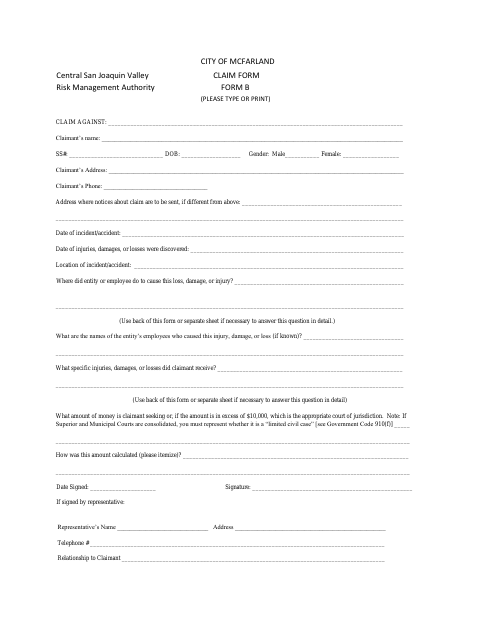
The Claim Form lets a person submit a claim against the City of McFarland for an incident involving injury, damage, or loss.
What this form is
Use this form to present a claim against the City of McFarland for injury, damage, or loss. It asks for claimant contact details, incident dates and location, what caused the loss, any known employees involved, the specific injuries or damages, and the amount sought with its calculation. The claimant or a representative signs and dates the form.
Who needs it
A claimant seeking money for injury, damage, or loss allegedly caused by the City or its employee can use this form.
How to submit it
Submit it to the city department named on the form; check the city website for current contact details.
About notarization
This claim form is signed and dated without a notary; it lists no notarized or sworn attachment, so the claimant or representative signs and dates it.
How to submit this form
- 1
Download The Claim Form
Download the City of McFarland Claim Form PDF.
- 2
Complete The Claim Details
Type or print the claimant, incident, injury or damage, and requested amount information.
- 3
Gather Any Extra Details
Use the back of the form or a separate sheet to explain the cause or specific losses in detail, if needed.
- 4
Sign And Submit
Date and sign the form, then submit it to the city department named on the form.
Frequently asked questions
- What does the McFarland Claim Form ask for?
- It requests claimant details, incident dates and location, information about what caused the loss, injuries or damages, the amount sought, and how that amount was calculated.
- Who can use this claim form?
- A claimant seeking money for injury, damage, or loss allegedly caused by the City of McFarland or an employee can use the form. A representative may sign it and provide their details.
- Do I need a notary for the McFarland Claim Form?
- No. The form has a signature and date field but no notary block or notarized attachment; the claimant or representative signs and dates it.
- How do I submit the McFarland Claim Form?
- Submit it to the city department named on the form; check the city website for current contact details.
Need something notarized?
This Claim Form doesn’t need a notary — but if you have another McFarland form that does, a commissioned online notary can help.