
Steamboat Springs, CO · Routt County
Surrounding Property Owner Notification Affidavit
This affidavit documents that an applicant or the applicant’s representative posted a sign on the project property as required for a Steamboat Springs planning application.
- licensed online notary
- ~15 min average
- Notarized PDF emailed
What you’ll need
- Government-issued photo ID
- Webcam-enabled device (laptop or phone)
- This form, ready to upload as a PDF
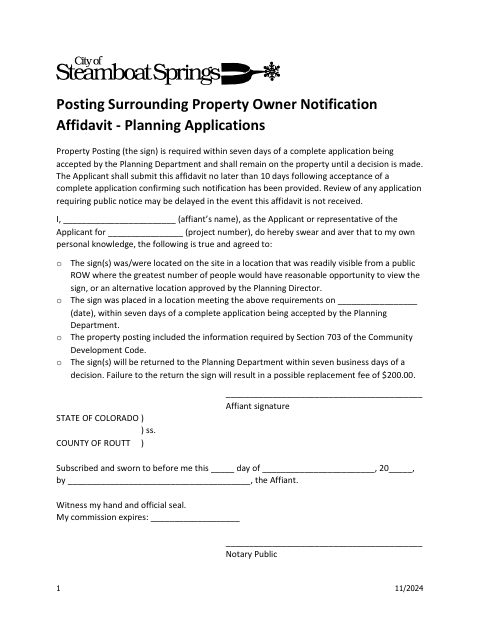
What this form is
The applicant or representative uses this affidavit to swear that the required property-posting sign was placed in a visible location within seven days after the Planning Department accepted a complete application. The form also confirms the posting included required information and states that the sign will be returned to the Planning Department within seven business days after a decision. Submit the affidavit no later than 10 days after acceptance; review may be delayed if it is not received.
Who needs it
An applicant or the applicant’s representative files this affidavit after posting the required sign for a planning application in Steamboat Springs.
How to get this notarized
- 1
Download the Affidavit
Get the Surrounding Property Owner Notification Affidavit from the Steamboat Springs document source.
- 2
Fill In the Details
Enter the affiant’s name, project number, posting date, and other requested information.
- 3
- 4
Sign on Video
Sign and swear to the affidavit during the online notary session.
- 5
Submit to the City
Send the notarized affidavit to the Planning Department by the form’s stated deadline.
Preview the form
The blank PDF straight from Steamboat Springs. Look it over, then upload your filled copy to start the notary session.

You’ll need ID and a webcam.
A licensed online notary will join you on video, verify your government-issued ID, witness your signature, and apply their seal. You’ll receive the notarized PDF by email when the session ends.
Frequently asked questions
- How do I get the property posting affidavit notarized online?
- Complete the affidavit, then book with a commissioned online notary. Sign and swear to the statements during the video session, and submit the notarized form to the Planning Department.
- Do I need to sign this affidavit in front of a notary?
- Yes. The form includes a jurat requiring the named affiant to subscribe and swear to the affidavit before a notary public.
- Can I use an online notary for this form?
- Colorado authorizes remote online notarization under C.R.S. §24-21-514.5. Check that the city will accept the remotely notarized affidavit; confirm with the city or town if unsure.
- When must I submit the affidavit?
- The form says to submit it no later than 10 days after the Planning Department accepts a complete application. Review of an application requiring public notice may be delayed if the affidavit is not received.
Other forms in Steamboat Springs
Business Entity or Trust Ownership Affidavit
Steamboat Springs
Mineral Right Owner Notification Affidavit
Steamboat Springs
Refuse Collection and Transportation License Application
Steamboat Springs
Short-Term Rental License Exemption Application and Affidavit
Steamboat Springs
Short-Term Rental Self-Inspection Checklist and Affidavit
Steamboat Springs
Surrounding Property Owner Notification Affidavit
Steamboat Springs