
Gray, GA · Jones County
Occupational Tax Application
Individuals, businesses, and practitioners use this application to report business and employee information and request an occupational or professional license from the City of Gray.
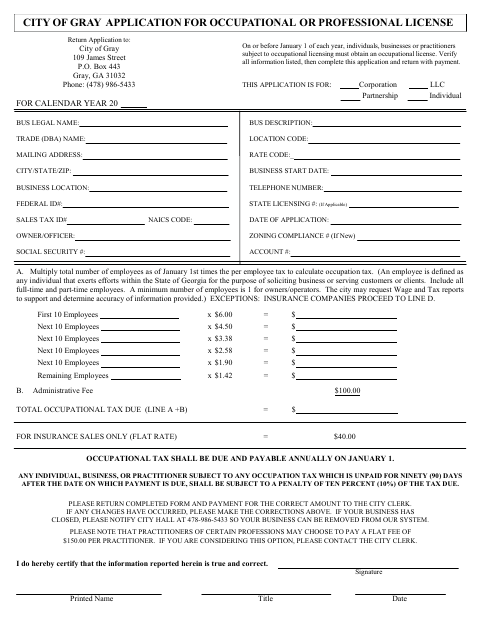
What this form is
The City of Gray uses this application for occupational or professional licensing; the document says covered individuals, businesses, or practitioners must obtain a license on or before January 1 each year. It asks for business and owner details, employee counts, and tax calculations, including an administrative fee. Applicants certify the information is true and correct, sign and date the form, and return it with payment.
Who needs it
Individuals, businesses, and practitioners subject to occupational licensing in Gray use this application to report their information and pay the applicable tax.
How to submit it
Return the completed application and payment to the City Clerk at City of Gray, 109 James Street, P.O. Box 443, Gray, GA 31032.
About notarization
This application is signed without a notary; the signer certifies the information and provides a signature, printed name, title, and date.
How to submit this form
- 1
Download The Application
Download the City of Gray Occupational Tax Application PDF.
- 2
Complete The Application
Provide the requested business, owner, employee, and tax information, then sign and date the certification.
- 3
Gather Payment
Include payment for the amount calculated on the application.
- 4
Submit To The City Clerk
Return the completed application and payment to the City Clerk at the address listed on the form.
Frequently asked questions
- Who should complete the Gray Occupational Tax Application?
- Individuals, businesses, and practitioners subject to occupational licensing in Gray should complete the application. It requests business, owner, employee, and tax information.
- How do I submit the Gray Occupational Tax Application?
- Return the completed form with payment to the City Clerk at City of Gray, 109 James Street, P.O. Box 443, Gray, GA 31032.
- Do I need a notary for the Gray Occupational Tax Application?
- No. This application has no notary block; the signer certifies the information and provides a signature, printed name, title, and date.
- What information does the application request?
- The application asks for business and owner details, employee counts, and occupational tax calculations. The signer certifies that the information reported is true and correct.
Need something notarized?
This Occupational Tax Application doesn’t need a notary — but if you have another Gray form that does, a commissioned online notary can help.