
Oconee County, GA · Oconee County
Applicant’s Oath
This oath records an applicant’s statements that information submitted with an application is true and correct.
At a glance
- Issued by
- City of Oconee County · Oconee County, Oconee County, Georgia
- Notarization
- Not required: file this form without a notary.
- Official source
- oconeecountyga.gov
- Blank form
- Download the PDF
- Catalogued
- Machine-readable
- JSON record · about the forms index
What this form is
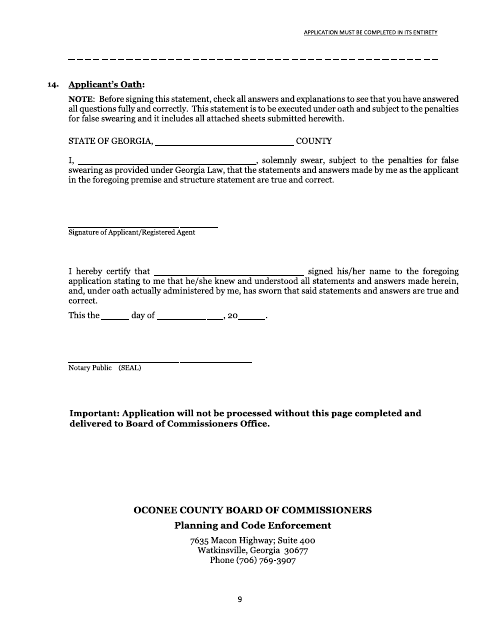
The Applicant’s Oath states that the applicant’s statements and answers, including information on attached sheets, are true and correct. It also says the oath is made under penalty for false statements. The applicant provides identifying information and signs the statement to affirm the application information.
Who needs it
An applicant submitting the application associated with this oath should complete and sign it with the related statements and answers.
How to submit it
Submit it to the county department named on the form; check the county website for current contact details.
About notarization
This document is signed without a notary; the signer just signs and dates it.
How to submit this form
- 1
Download the Oath
Download the Applicant’s Oath PDF.
- 2
Complete the Oath
Provide the requested applicant information and affirm that the statements and answers are true and correct.
- 3
Gather Related Documents
Include the application statements and any attached sheets referenced by the oath.
- 4
Sign and Submit
Sign and date the oath, then submit it to the county department named on the form.
Frequently asked questions
- What does the Applicant’s Oath affirm?
- It states that the applicant’s statements and answers, including information on attached sheets, are true and correct.
- Who completes the Applicant’s Oath?
- The applicant completes and signs the oath in connection with the application and its statements and answers.
- Do I need a notary for the Applicant’s Oath?
- No. This document is signed without a notary; the signer just signs and dates it.
- How do I submit the Applicant’s Oath?
- Submit it to the county department named on the form. Check the county website for current contact details.