
Clayton, GA · Rabun County
Occupational Tax Application
Clayton businesses use this application to provide business and owner information and apply for an occupational tax certificate.
What this form is
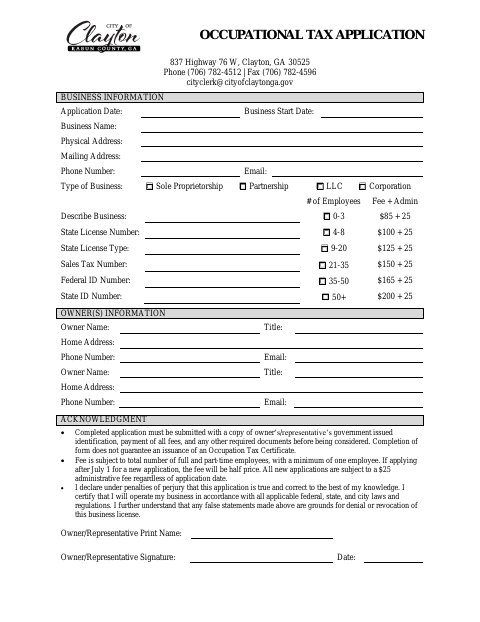
This application collects business details, ownership information, employee count, and license and identification numbers for an occupational tax certificate. The city requires a completed application, a copy of the owner’s or representative’s government-issued identification, payment of applicable fees, and any other required documents before considering it; completing the form does not guarantee issuance.
Who needs it
A business applying for an occupational tax certificate in Clayton should complete this application and provide the listed supporting documents.
How to submit it
Submit the completed application with a copy of the owner’s or representative’s government-issued identification, payment of all fees, and any other required documents. The form lists the City Clerk at 837 Highway 76 W, Clayton, GA 30525, and [email protected].
About notarization
This document is signed without a notary; the signer declares the application true and correct under penalties of perjury, then signs and dates it.
How to submit this form
- 1
Download the Application
Download the Occupational Tax Application to provide information for a Clayton business.
- 2
Complete the Form
Enter the business details, employee count, license and identification numbers, and owner information.
- 3
Gather Required Documents
Include a copy of the owner’s or representative’s government-issued identification and any other required documents.
- 4
Submit to the City
Submit the application with payment of all fees to the City Clerk using the contact details listed on the form.
Frequently asked questions
- Do I need a notary for the Occupational Tax Application?
- No. The form has no notary block; the owner or representative makes a declaration under penalties of perjury and signs and dates the application.
- How do I submit the Occupational Tax Application?
- Submit the completed form with a copy of the owner’s or representative’s government-issued identification, payment of all fees, and any other required documents. The form lists the City Clerk’s address and email.
- What information does the application ask for?
- It asks for business details, business type, employee count, license and identification numbers, and owner or owners’ contact information.
- Does completing the application guarantee an occupational tax certificate?
- No. The form states that completing the application does not guarantee issuance of an occupational tax certificate.