
Wilmington, IL · Greene County
Planned Unit Development Application Supplement
This six-page supplement collects project details and responses to review criteria for a planned unit development request, for the property owner or authorized agent to submit to the City of Wilmington.
- licensed online notary
- ~15 min average
- Notarized PDF emailed
What you’ll need
- Government-issued photo ID
- Webcam-enabled device (laptop or phone)
- This form, ready to upload as a PDF
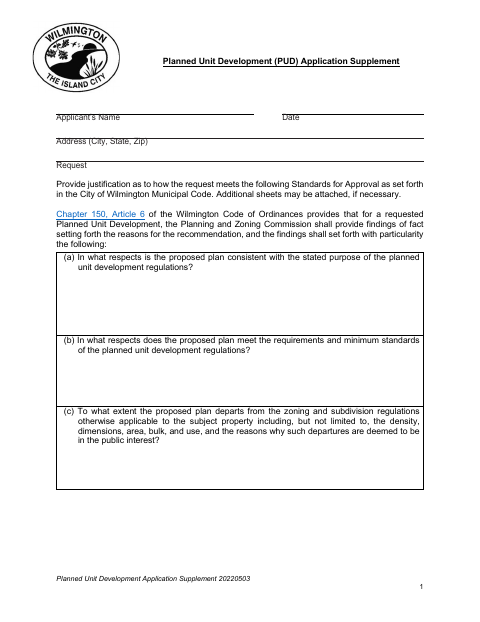
What this form is
The supplement asks the applicant to explain how the proposed development meets the city’s approval standards, including compatibility, public services, traffic, open space, and consistency with the comprehensive plan. It also includes Planning and Zoning Commission review questions, an authorization and sworn statement, and choices about responsibility for written public notices. Complete it as part of a planned unit development request and follow the city’s instructions for filing and the public hearing.
Who needs it
A property owner or authorized agent seeking planned unit development review should complete this supplement and submit it with the request to the City of Wilmington.
How to get this notarized
- 1
Download the Application
Get the Planned Unit Development Application Supplement from the City of Wilmington.
- 2
Complete the Form
Enter applicant and request information, answer the review criteria, and select the public-notice option that applies.
- 3
Book an Online Notary
Arrange a remote appointment with a commissioned online notary for the sworn statement.
- 4
Take the Oath and Sign
Appear on video, take the required oath, and sign the statement as directed by the notary.
- 5
Submit to the City
Submit the completed supplement with your planned unit development request according to the city’s filing instructions.
Preview the form
The blank PDF straight from Wilmington. Look it over, then upload your filled copy to start the notary session.

You’ll need ID and a webcam.
A licensed online notary will join you on video, verify your government-issued ID, witness your signature, and apply their seal. You’ll receive the notarized PDF by email when the session ends.
Frequently asked questions
- How do I complete the sworn statement on this application?
- Complete the application, then sign the undersigned statement while appearing before a notary and taking an oath. The notary completes the jurat, including the date and notarial signature.
- Do I need to sign the application in front of a notary?
- Yes. The form includes a jurat stating that the undersigned subscribed and swore to the statement before a notary. Do not sign that statement until the notary directs you to do so.
- Can I use a commissioned online notary?
- Illinois authorizes electronic and remote notarization for its own notaries, and recognizes notarial acts performed outside Illinois by an officer authorized where the act takes place. Confirm with the city or village if unsure.
- Who is responsible for the public notices?
- The form says the city will complete required postings unless the petitioner confirms an intent to complete written notices. A petitioner choosing that option takes responsibility for their accuracy and timeliness and must confirm details with city staff.
Planned Unit Development Application Supplement in other Illinois cities
Each city publishes its own version of this form. Pick the city where you’re filing.