
Mapleton, IL · Peoria County
PUEZ Project Information Form
This form collects project, owner, cost, and contractor details for a Peoria Urban Enterprise Zone project and is filed by the property owner and participating contractors or subcontractors.
At a glance
- Issued by
- City of Mapleton · Mapleton, Peoria County, Illinois
- Notarization
- Required: sign this form in front of a notary before filing it.
- Official source
- mapletonillinois.com
- Blank form
- Download the PDF
- Catalogued
- Machine-readable
- JSON record · about the forms index
- licensed online notary
- ~15 min average
- Notarized PDF emailed
What you’ll need
- Government-issued photo ID
- Webcam-enabled device (laptop or phone)
- This form, ready to upload as a PDF
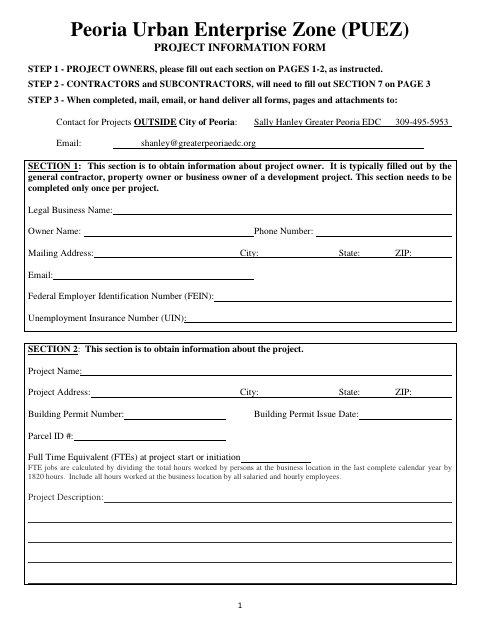
What this form is
The form records information about a project in the Peoria Urban Enterprise Zone and lets the property owner apply for available sales tax exemption and property tax abatement incentives. The owner completes Sections 1–6 and attaches a building permit copy and fee payment; each contractor or subcontractor purchasing materials completes Section 7. Submit the completed forms and attachments to the listed project contact.
Who needs it
Property owners seeking Peoria Urban Enterprise Zone incentives complete the owner sections, and each contractor or subcontractor purchasing project materials completes Section 7.
Why it needs a notary
The owner signs the Section 6 certification before a notary; the form includes a subscribed-and-sworn jurat with a notary seal and signature line.
How to get this notarized
- 1
Download the Form
Get the PUEZ Project Information Form and review its instructions and incentive requirements.
- 2
Complete the Owner Sections
The property owner completes Sections 1–6 and gathers the required building permit copy and fee payment.
- 3
Complete Contractor Sections
Have each contractor or subcontractor purchasing materials complete Section 7.
- 4
Book an Online Notary
Arrange a remote notarization appointment for the owner's sworn Section 6 certification.
- 5
Sign on Video
Sign the owner's certification in front of the commissioned online notary during the video session.
- 6
Submit to the City Contact
Send all completed forms, pages, and attachments to the project contact using an accepted delivery method.
Preview the form
The blank PDF straight from Mapleton. Look it over, then upload your filled copy to start the notary session.

You’ll need ID and a webcam.
A licensed online notary will join you on video, verify your government-issued ID, witness your signature, and apply their seal. You’ll receive the notarized PDF by email when the session ends.
Frequently asked questions
- How do I submit the completed PUEZ project form?
- Complete the owner sections, attach the building permit copy and Enterprise Zone fee payment, and have each applicable contractor or subcontractor complete Section 7. The form says to mail, email, or hand deliver all forms, pages, and attachments to the listed project contact.
- Do I need to notarize the contractor section?
- The form's notary block follows the property owner's Section 6 certification. Section 7 has a contractor or subcontractor certification and signature line, but no notary block.
- Can I sign the owner's certification with an online notary?
- Illinois authorizes electronic and remote notarization by its notaries and recognizes notarial acts performed outside Illinois by an officer authorized where the act takes place. Use a commissioned online notary and confirm the receiving office accepts your completed form.
- Who completes Section 7?
- Each contractor or subcontractor purchasing materials for the project completes Section 7. The form notes that you may need to make copies for each contractor or subcontractor.
- Where should I send the application?
- The form directs projects outside the City of Peoria to the listed Greater Peoria EDC project contact, by mail, email, or hand delivery. Confirm with the city or village if unsure which contact applies to your project.