
Columbus, IN · Bartholomew County
Subdivision Improvement Agreement
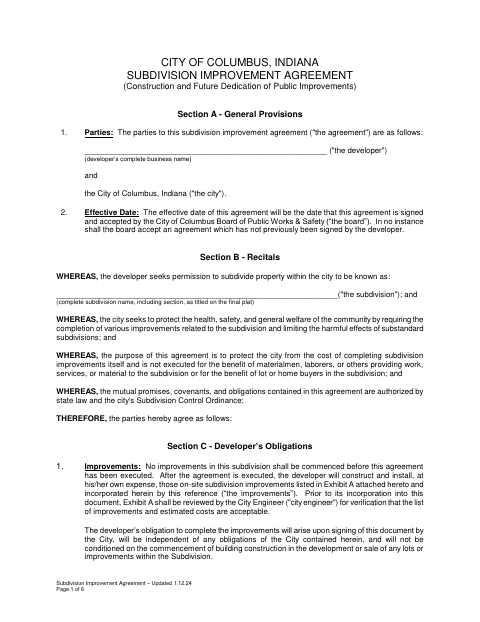
This six-page agreement sets out a developer’s obligations to construct and maintain subdivision improvements and is submitted by a developer seeking permission to subdivide property within Columbus.
- licensed online notary
- ~15 min average
- Notarized PDF emailed
What you’ll need
- Government-issued photo ID
- Webcam-enabled device (laptop or phone)
- This form, ready to upload as a PDF
What this form is
Columbus uses this agreement to set requirements for public improvements associated with a subdivision, including construction, maintenance guarantees, inspections, and completion deadlines. The developer must sign and submit it before starting improvements; the agreement takes effect when the City of Columbus Board of Public Works & Safety signs and accepts it. The form also provides for the agreement to be recorded with the Bartholomew County Recorder.
Who needs it
A developer seeking permission to subdivide property in Columbus and responsible for the subdivision improvements must complete this agreement.
Why it needs a notary
The form includes a state jurat with a subscribed-and-sworn statement; the developer signs and swears to the agreement before the notary.
How to get this notarized
- 1
Download the Agreement
Download the City of Columbus Subdivision Improvement Agreement and review its sections and referenced exhibits.
- 2
Complete the Form
Enter the developer’s complete business name, subdivision name, and other required details.
- 3
Book an Online Notary
Schedule a session with a commissioned online notary to complete the developer’s jurat.
- 4
Sign on Video
The developer signs and swears to the agreement during the online notary session.
- 5
Submit to the City
Submit the signed agreement to the City of Columbus for acceptance by the Board of Public Works & Safety.
Preview the form
The blank PDF straight from Columbus. Look it over, then upload your filled copy to start the notary session.

You’ll need ID and a webcam.
A licensed online notary will join you on video, verify your government-issued ID, witness your signature, and apply their seal. You’ll receive the notarized PDF by email when the session ends.
Frequently asked questions
- How do I complete and notarize this agreement?
- Fill in the developer and subdivision details, then book with a commissioned online notary. The developer signs and swears to the agreement during the video session before submitting it to the city.
- Do I need to sign in front of a notary?
- Yes. The agreement includes a jurat stating that the developer subscribed and swore to it before a notary. Sign during the notarial session rather than beforehand.
- Can I use a commissioned online notary?
- Indiana authorizes remote online notarization through a remote notary public endorsement for its notaries. A commissioned online notary can perform the notarization remotely, subject to applicable requirements.
- Where do I submit the completed agreement?
- Submit the signed agreement to the City of Columbus for acceptance by its Board of Public Works & Safety. The agreement says either party may record a copy with the Bartholomew County Recorder; confirm with the city or town if unsure.