
Carmel, IN · Hamilton County
Secondary Plat or Replat Application
This application starts Carmel’s review of a secondary plat or replat and is filed by the applicant proposing a subdivision or changes to an existing subdivision.
- licensed online notary
- ~15 min average
- Notarized PDF emailed
What you’ll need
- Government-issued photo ID
- Webcam-enabled device (laptop or phone)
- This form, ready to upload as a PDF
What this form is
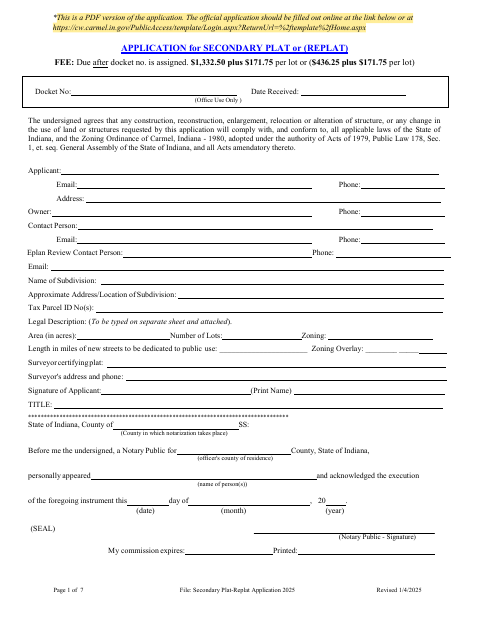
Use this application to provide subdivision, parcel, ownership, surveyor, zoning, and contact details for a proposed secondary plat or replat. Carmel’s form outlines the supporting plat, plans, approvals, and other materials required for review, which is handled administratively. The applicant first submits the completed application to DOCS staff; plat and construction plans are submitted through ProjectDox, and the form describes later approvals and recording steps.
Who needs it
An applicant proposing a secondary plat or replat in Carmel should complete this application and provide the listed supporting materials for city review.
Why it needs a notary
The application carries an acknowledgment block for the applicant, and its deed of dedication form carries a separate acknowledgment for the property owners; each signer appears before a notary.
How to get this notarized
- 1
Download the Application
Get Carmel’s Secondary Plat or Replat Application PDF, or use the official online application noted on the form.
- 2
Complete the Application
Fill in the applicant, owner, subdivision, parcel, surveyor, and other requested details; prepare the listed supporting materials.
- 3
Book an Online Notary
Arrange a remote notarization for the applicable applicant acknowledgment and, if needed, the deed of dedication acknowledgment.
- 4
Sign on Video
Appear before the commissioned online notary and sign the applicable acknowledgment when instructed.
- 5
Submit to Carmel
Email the completed application to DOCS staff, then submit the plat and construction plans through ProjectDox as directed.
Preview the form
The blank PDF straight from Carmel. Look it over, then upload your filled copy to start the notary session.

You’ll need ID and a webcam.
A licensed online notary will join you on video, verify your government-issued ID, witness your signature, and apply their seal. You’ll receive the notarized PDF by email when the session ends.
Frequently asked questions
- How do I submit the Secondary Plat or Replat Application?
- The form says to email the completed application to DOCS staff first. Submit the plat and construction plans electronically through ProjectDox, and follow Carmel’s listed review and filing steps.
- Do I need to notarize the application?
- The application includes an acknowledgment for the applicant, and the deed of dedication form includes an acknowledgment for the property owners. Sign the applicable block before a notary.
- Can I sign this form with a remote online notary?
- Indiana provides for a remote notary public endorsement for its notaries under IC 33-42-17. Ask the city whether it accepts this document with an online notarization; confirm with the city or town if unsure.
- Where is the approved plat recorded?
- The instructions direct the petitioner to take the signed Mylar plat to the Hamilton County Recorder’s Office in Noblesville for recording, then provide Carmel with a scanned recorded plat and a paper copy.