
Caney, KS · Montgomery County
Non-Partisan City/School Nomination Petition
This petition lets registered voters nominate a candidate for a city or school office, and the circulator or candidate completes the attached affidavit for filing with the appropriate election officials.
At a glance
- Issued by
- City of Caney · Caney, Montgomery County, Kansas
- Notarization
- Required: sign this form in front of a notary before filing it.
- Official source
- caneyks.com
- Blank form
- Download the PDF
- Catalogued
- Machine-readable
- JSON record · about the forms index
- licensed online notary
- ~15 min average
- Notarized PDF emailed
What you’ll need
- Government-issued photo ID
- Webcam-enabled device (laptop or phone)
- This form, ready to upload as a PDF
What this form is
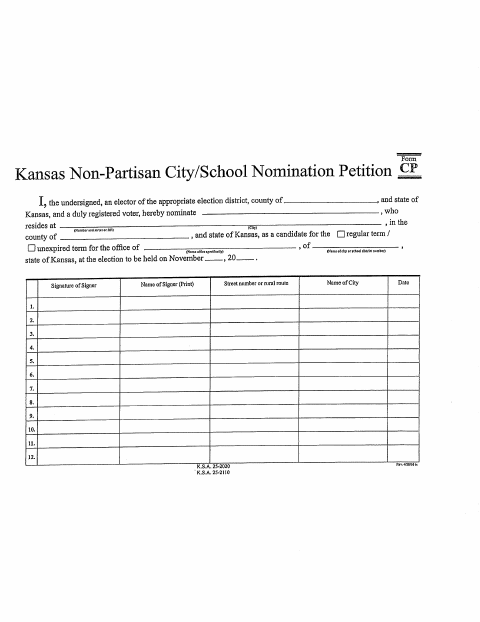
Use this Kansas non-partisan petition to nominate a candidate for a city or school district office for a regular or unexpired term. The petition includes spaces for voter signatures and a circulator affidavit stating that the signer witnessed each listed person sign; a candidate may also complete the affidavit. Submit the completed petition through the filing process for the relevant election district.
Who needs it
Candidates seeking nomination for a city or school district office, and petition circulators who witnessed the petition signatures, may need this form for filing.
How to get this notarized
- 1
Download the Petition
Download the two-page Kansas Non-Partisan City/School Nomination Petition.
- 2
Fill In the Petition
Complete the candidate, office, election, signer, and circulator information that applies. Leave the affidavit signature for the notary session.
- 3
Book an Online Notary
Arrange a remote notarization with a commissioned online notary for the circulator affidavit.
- 4
Sign on Video
Appear by video, take the oath or affirmation, and sign the affidavit as directed by the notary.
- 5
Submit to Election Officials
Submit the completed, notarized petition through the filing process for the appropriate election district.
Preview the form
The blank PDF straight from Caney. Look it over, then upload your filled copy to start the notary session.

You’ll need ID and a webcam.
A licensed online notary will join you on video, verify your government-issued ID, witness your signature, and apply their seal. You’ll receive the notarized PDF by email when the session ends.
Frequently asked questions
- How do I get the petition affidavit notarized online?
- Complete the petition and affidavit, then book with a commissioned online notary. Sign the affidavit during the video session when directed, and submit the notarized petition through the appropriate election filing process.
- Do I need to notarize the voter signatures?
- The form's notary section is the circulator affidavit, where the circulator or candidate swears to the statement. The voter signature area is separate; follow the form instructions for completing it.
- Can a commissioned online notary notarize this Kansas form?
- Kansas authorizes remote online notarization by a commissioned online notary. The signer appears by live video and completes the oath or affirmation for the affidavit.
- Where do I file the completed nomination petition?
- The form identifies a city or school district election and office but does not name a filing office. Check the filing instructions for the relevant election district; confirm with the city if unsure.
Non-Partisan City/School Nomination Petition in other Kansas cities
Each city publishes its own version of this form. Pick the city where you’re filing.