
Prestonsburg, KY · Floyd County
Claim for Refund of Occupational Fee
This two-page claim lets an employee request a refund of Prestonsburg occupational fees withheld from wages, using work-hour and W-2 information to calculate the amount claimed.
At a glance
- Issued by
- City of Prestonsburg · Prestonsburg, Floyd County, Kentucky
- Notarization
- Required: sign this form in front of a notary before filing it.
- Official source
- prestonsburgcity.org
- Blank form
- Download the PDF
- Catalogued
- Machine-readable
- JSON record · about the forms index
- licensed online notary
- ~15 min average
- Notarized PDF emailed
What you’ll need
- Government-issued photo ID
- Webcam-enabled device (laptop or phone)
- This form, ready to upload as a PDF
What this form is
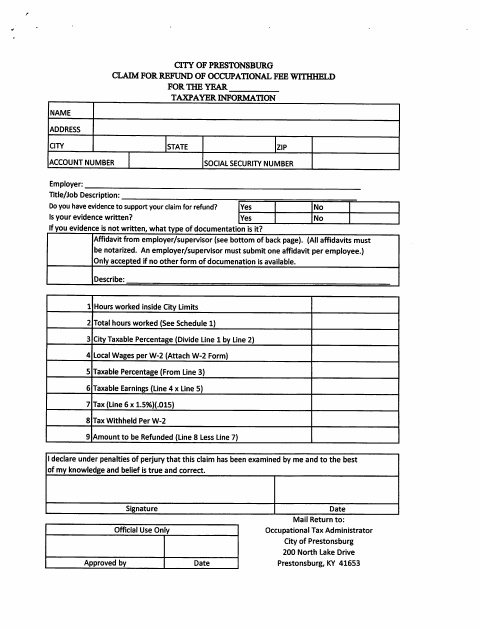
Use this form to claim a refund of occupational fees withheld for the year by reporting hours worked inside Prestonsburg, total hours worked, W-2 wages, and tax withheld. The form calculates taxable earnings and the refund amount; attach the W-2 and supporting evidence. If written evidence is unavailable and no other documentation is available, an employer or supervisor must submit the affidavit on the back page, with one notarized affidavit per employee.
Who needs it
An employee seeking a refund of occupational fees withheld for the year should complete the claim and provide the requested work-hour, wage, withholding, and supporting information.
How to get this notarized
- 1
Download the Claim
Download the two-page occupational fee refund claim and review its instructions and affidavit.
- 2
Complete the Form
Enter taxpayer and employer information, calculate hours and taxable earnings, and attach the W-2 and available evidence.
- 3
Book an Online Notary
If the affidavit is required, arrange an online notarization for the employer or supervisor who will sign it.
- 4
Sign on Video
The employer or supervisor signs and swears to the affidavit during the online notary session.
- 5
Submit to the City
Send the completed claim and supporting documents to the Occupational Tax Administrator at the address listed on the form.
Preview the form
The blank PDF straight from Prestonsburg. Look it over, then upload your filled copy to start the notary session.

You’ll need ID and a webcam.
A licensed online notary will join you on video, verify your government-issued ID, witness your signature, and apply their seal. You’ll receive the notarized PDF by email when the session ends.
Frequently asked questions
- Do I need to notarize the entire refund claim?
- No. The form says the employer or supervisor affidavit on the back must be notarized when written evidence is unavailable and no other documentation is available.
- Who signs the affidavit?
- An employer or supervisor signs the affidavit and swears that the information is correct and that written documentation is unavailable. The form requires one affidavit per employee.
- How do I get the affidavit notarized online?
- Book a session with a commissioned online notary, show identification, and sign the affidavit during the video session. Kentucky authorizes online notarization for notaries registered as online notaries under KRS 423.355; KRS 423.345 and KRS 423.110 recognize certain acts by notaries or authorized officers from elsewhere.
- Where do I send the completed claim?
- The form lists the Occupational Tax Administrator, City of Prestonsburg, 200 North Lake Drive, Prestonsburg, KY 41653, as the return address. Confirm with the city or county clerk if unsure.