
Riverwood, KY · Jefferson County
Declaration of Restrictions
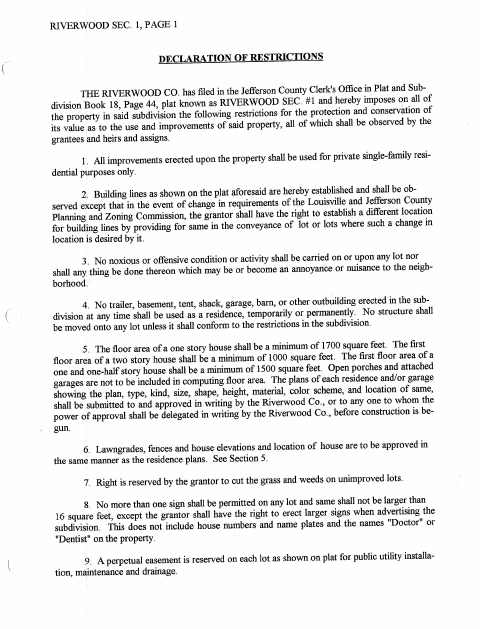
This recorded declaration sets use, building, and property restrictions for Riverwood subdivision sections, and is signed by the corporation or other parties imposing or amending those restrictions.
At a glance
- Issued by
- City of Riverwood · Riverwood, Jefferson County, Kentucky
- Notarization
- Required: sign this form in front of a notary before filing it.
- Official source
- riverwoodky.org
- Blank form
- Download the PDF
- Catalogued
- Machine-readable
- JSON record · about the forms index
- licensed online notary
- ~15 min average
- Notarized PDF emailed
What you’ll need
- Government-issued photo ID
- Webcam-enabled device (laptop or phone)
- This form, ready to upload as a PDF
What this form is
The document states restrictions for Riverwood Sections 1, 2, and 3, including residential use, building plans, lot improvements, and utility easements. It also includes amended restrictions and acknowledgment language for corporate signers. The text says the restrictions were recorded with the Jefferson County Clerk; it does not state a current city filing requirement, so check with the clerk before submitting a new or amended instrument.
Who needs it
A corporation or other authorized party imposing or amending restrictions on Riverwood subdivision property may need this document for signing and recording.
Why it needs a notary
The form carries acknowledgment blocks headed Commonwealth of Kentucky; the corporate representatives named in each declaration sign or acknowledge the instrument before a notary.
How to get this notarized
- 1
Download the Document
Get the Declaration of Restrictions PDF and identify the section or amendment that applies.
- 2
Review and Complete
Review the restrictions and complete applicable information without signing the notarial certificate.
- 3
Book an Online Notary
Schedule a session with a commissioned online notary and have identification ready.
- 4
Sign on Video
Sign or acknowledge the document during the online notary session.
- 5
Submit to the Clerk
Check filing requirements, then submit the completed document to the appropriate clerk.
Preview the form
The blank PDF straight from Riverwood. Look it over, then upload your filled copy to start the notary session.

You’ll need ID and a webcam.
A licensed online notary will join you on video, verify your government-issued ID, witness your signature, and apply their seal. You’ll receive the notarized PDF by email when the session ends.
Frequently asked questions
- How do I prepare this declaration for notarization?
- Review the restrictions and identify the applicable section and signer. Leave the notarial certificate unsigned, then sign or acknowledge the document before the notary.
- Do I need to record this document with the city?
- The form text says the restrictions were recorded with the Jefferson County Clerk. It does not state a current filing requirement; confirm with the city or county clerk if unsure.
- Can I sign this form with an online notary?
- Kentucky permits online notarization by a commissioned online notary registered for online notarizations. Check with the receiving clerk that the notarized document and certificate format will be accepted.
- Who signs the declaration before the notary?
- The text identifies corporate representatives signing on behalf of The Riverwood Co. for the declarations shown. The appropriate authorized signer should confirm their authority before signing.