
Springfield, MA · Hampden County
Application for a License to Buy, Sell, Exchange or Assemble Motor Vehicles
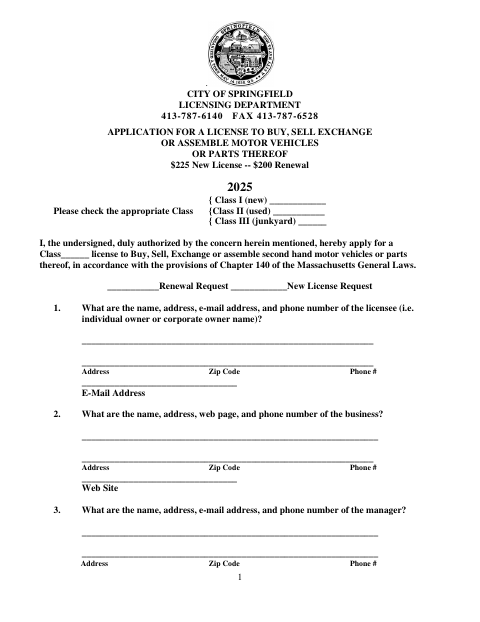
Springfield’s 2025 application is for individuals or businesses seeking a Class I, II, or III license to buy, sell, exchange, or assemble motor vehicles or parts.
- licensed online notary
- ~15 min average
- Notarized PDF emailed
What you’ll need
- Government-issued photo ID
- Webcam-enabled device (laptop or phone)
- This form, ready to upload as a PDF
What this form is
The seven-page form collects applicant, business, ownership, premises, and tax information for a new or renewed motor vehicle license. Applicants answer questions about business operations and certain permits, and the packet includes tax certifications and a workers’ compensation insurance affidavit. The form says it must be completed and filed with the application; it also directs applicants who did not hold a license in the prior year to file a duplicate with the registrar.
Who needs it
Individuals or businesses applying for or renewing a Springfield Class I, II, or III license to buy, sell, exchange, or assemble motor vehicles or parts need this form.
Why it needs a notary
The Commonwealth tax certification includes a jurat: the authorized company representative named in the block personally appears, is sworn, and signs before the notary.
How to get this notarized
- 1
Download the Application
Download Springfield’s 2025 motor vehicle license application and review its questions and supporting-document instructions.
- 2
Fill Out the Form
Complete the applicable license, business, ownership, premises, and tax sections; gather any supporting documents the form requests.
- 3
Book an Online Notary
Book a commissioned online notary for the Commonwealth tax certification jurat.
- 4
Sign on Video
The authorized representative appears by video, takes the oath, and signs the certification as directed by the notary.
- 5
Submit to the City
File the completed application and required attachments with the City of Springfield Licensing Department.
Preview the form
The blank PDF straight from Springfield. Look it over, then upload your filled copy to start the notary session.

You’ll need ID and a webcam.
A licensed online notary will join you on video, verify your government-issued ID, witness your signature, and apply their seal. You’ll receive the notarized PDF by email when the session ends.
Frequently asked questions
- How do I get the tax certification notarized?
- Complete the certification, then have the authorized representative named in the notary block appear before a commissioned online notary, take the oath, and sign.
- Do I need to notarize every signature on the application?
- The form includes a notary jurat for the Commonwealth tax certification. Follow the form’s notary block for that certification and check with the city or town clerk if unsure.
- Can I sign the tax certification online?
- Massachusetts permanently authorized remote online notarization for its own notaries effective January 1, 2024. A commissioned online notary can notarize the oath and signature by video; confirm the city’s acceptance if unsure.
- What should I submit with the application?
- The form says to complete it fully and file it with the application. It also requests supporting documents for certain answers, such as permits, contracts, or a workers’ compensation policy declaration page.
Other forms in Springfield
Application for a License to Buy, Sell, Exchange or Assemble Motor Vehicles in other Massachusetts cities
Each city publishes its own version of this form. Pick the city where you’re filing.