
Bloomington, MN · Hennepin County
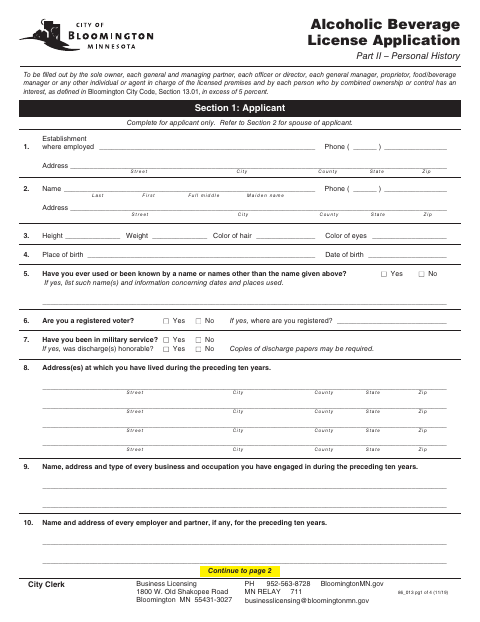
Alcoholic Beverage License Application Part II – Personal History
This four-page personal history application collects background information and a sworn declaration from individuals who must provide information for a Bloomington alcoholic beverage license application.
At a glance
- Issued by
- City of Bloomington · Bloomington, Hennepin County, Minnesota
- Notarization
- Required: sign this form in front of a notary before filing it.
- Official source
- bloomingtonmn.gov
- Blank form
- Download the PDF
- Catalogued
- Machine-readable
- JSON record · about the forms index
- licensed online notary
- ~15 min average
- Notarized PDF emailed
What you’ll need
- Government-issued photo ID
- Webcam-enabled device (laptop or phone)
- This form, ready to upload as a PDF
What this form is
Bloomington uses this form to collect personal, employment, family, and licensing history from people connected to an alcoholic beverage license applicant. The applicant and other listed individuals must complete it, including the spouse section when applicable, and sign the declaration on page four. The form states that the information will be used to approve the license and that incomplete information may affect approval.
Who needs it
The sole owner, specified partners, officers, managers, premises representatives, and people with an interest exceeding five percent must complete this form.
Why it needs a notary
The form includes a subscribed-and-sworn jurat; the applicant signs the declaration before the notary and the notary signs the page-four block.
How to get this notarized
- 1
Download The Form
Get Bloomington’s Alcoholic Beverage License Application Part II – Personal History.
- 2
Complete The Form
Fill in the applicable sections, including the spouse section if married, and review your answers.
- 3
Book An Online Notary
Schedule a remote notarization session with a commissioned online notary.
- 4
Sign On Video
Sign the applicant declaration during the video session when instructed by the notary.
- 5
Submit To The City
Send the completed form to the City of Bloomington as part of the license application.
Preview the form
The blank PDF straight from Bloomington. Look it over, then upload your filled copy to start the notary session.

You’ll need ID and a webcam.
A licensed online notary will join you on video, verify your government-issued ID, witness your signature, and apply their seal. You’ll receive the notarized PDF by email when the session ends.
Frequently asked questions
- How do I get the personal history form notarized?
- Complete the form, then book a session with a commissioned online notary. Sign the applicant declaration during the video session, after the notary instructs you.
- Do I need to complete the spouse section?
- The form says to complete Section 2 if you are married; otherwise, proceed to question 18. All applicants complete Section 3.
- What kind of notary block is on this form?
- Page four has a subscribed-and-sworn jurat with spaces for the date, notary signature, and commission expiration.
- Can I use an online notary for this form?
- Minnesota authorizes remote online notarization by a commissioned online notary under Minn. Stat. §358.645. Confirm with the city if unsure whether it will accept your completed form.
Other forms in Bloomington
Affidavit of Consent
Bloomington
Alcoholic Beverage License Application Part 1
Bloomington
Body Art Establishment License Application Part I
Bloomington
Body Art Establishment License Application Part II – Personal History
Bloomington
Pawnbroker, Precious Metal or Secondhand Goods Dealer License Application Part II
Bloomington
Pawnbroker, Precious Metal or Secondhand Goods Dealer License Application Part I
Bloomington