
Quitman, MS · Clarke County
Beer License Application and Restaurant Affidavit
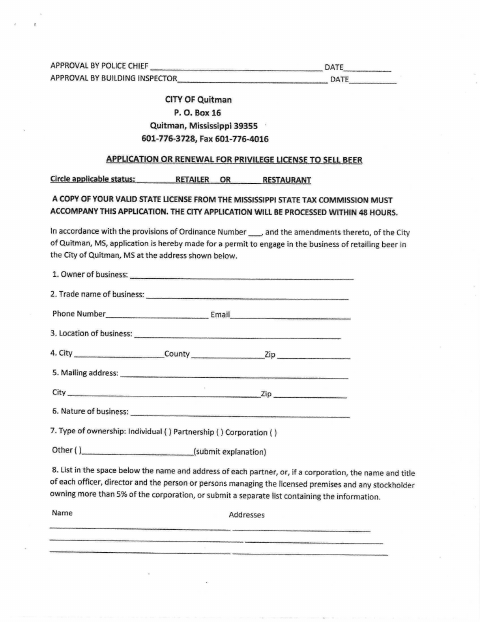
This application requests a City of Quitman permit to sell beer as a retailer or restaurant, and restaurant applicants also complete an affidavit about their business and licensing commitments.
At a glance
- Issued by
- City of Quitman · Quitman, Clarke County, Mississippi
- Notarization
- Required: sign this form in front of a notary before filing it.
- Official source
- cityquitman.net
- Blank form
- Download the PDF
- Catalogued
- Machine-readable
- JSON record · about the forms index
- licensed online notary
- ~15 min average
- Notarized PDF emailed
What you’ll need
- Government-issued photo ID
- Webcam-enabled device (laptop or phone)
- This form, ready to upload as a PDF
What this form is
Use this form to apply for or renew a City of Quitman privilege license to sell beer at a listed business location. The application asks about ownership, business premises, applicant eligibility, and required commitments; it also requires a valid state license copy. Restaurant applicants must complete the additional affidavit describing restaurant operations and related conditions.
Who needs it
Business owners applying to renew or obtain a Quitman beer-selling privilege license must submit the application, and restaurant applicants must also complete its affidavit.
How to get this notarized
- 1
Download the Form
Get the City of Quitman beer license application and review whether the restaurant affidavit applies.
- 2
Fill Out the Application
Provide the requested business, ownership, premises, and applicant information; attach the required valid state license copy.
- 3
Book an Online Notary
Schedule a commissioned online notary and check with the city that it will accept the notarization.
- 4
Sign on Video
Sign the application and any applicable restaurant affidavit during the notary video session.
- 5
Submit to the City
Send the completed form and required copy to the City of Quitman.
Preview the form
The blank PDF straight from Quitman. Look it over, then upload your filled copy to start the notary session.

You’ll need ID and a webcam.
A licensed online notary will join you on video, verify your government-issued ID, witness your signature, and apply their seal. You’ll receive the notarized PDF by email when the session ends.
Frequently asked questions
- How do I complete the notarized beer license application?
- Complete the application and any restaurant affidavit that applies, then book a commissioned online notary. Sign during the video session and submit the completed form and required state license copy to the city.
- Do I need to complete the restaurant affidavit?
- The form labels the affidavit for restaurant applications only. It asks the applicant to certify details about the restaurant and its operations.
- Can an online notarization be used for this application?
- Mississippi requires its own notaries to meet signers in person. A notarial act by a commissioned online notary from another state may have the same effect under Miss. Code §25-34-23; confirm acceptance with the city before signing.
- Where do I submit the completed application?
- The form is an application to the City of Quitman and lists the city’s mailing address. Confirm with the city or chancery clerk if unsure.