
Aberdeen, MS · Monroe County
Privilege License Application
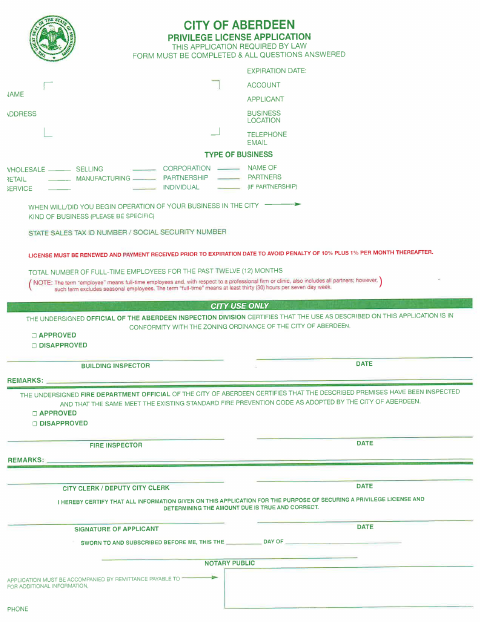
Aberdeen businesses use this application to provide business, ownership, location, and employee information and request a city privilege license, with the applicant’s certification sworn before a notary.
At a glance
- Issued by
- City of Aberdeen · Aberdeen, Monroe County, Mississippi
- Notarization
- Required: sign this form in front of a notary before filing it.
- Official source
- cityofaberdeenms.com
- Blank form
- Download the PDF
- Catalogued
- Machine-readable
- JSON record · about the forms index
- licensed online notary
- ~15 min average
- Notarized PDF emailed
What you’ll need
- Government-issued photo ID
- Webcam-enabled device (laptop or phone)
- This form, ready to upload as a PDF
What this form is
The City of Aberdeen privilege license application collects business details, the applicant’s tax identification information, the start date of city operations, and employee counts. It also includes sections for city inspection approvals and calculates fees using applicable schedules. Businesses complete the form to obtain or renew a license; the form says renewal payment is due before expiration to avoid penalties. Food sellers must attach a copy of their state health department food service permit.
Who needs it
Business owners or applicants seeking an Aberdeen privilege license must complete the application, answer all questions, and provide the required fee and any applicable permit attachment.
Why it needs a notary
The applicant signs the truth-and-correctness certification before the notary, who completes the form’s “sworn to and subscribed before me” jurat block.
How to get this notarized
- 1
Download the Application
Get the City of Aberdeen privilege license application and review both pages, including the fee schedules.
- 2
Complete the Business Details
Answer all questions about the business, ownership, location, operation date, tax identification, and employee count.
- 3
Calculate Fees and Gather Attachments
Use the applicable schedules to calculate the amount due; attach a food service permit copy if you sell food.
- 4
Book an Online Notary
Arrange a notarization with a commissioned online notary and have identification ready for the appointment.
- 5
Sign on Video
Sign the applicant certification during the notary session so the notary can complete the sworn-and-subscribed jurat.
- 6
Submit to the City
Send the completed application and required payment to the City of Aberdeen, following its current filing instructions.
Preview the form
The blank PDF straight from Aberdeen. Look it over, then upload your filled copy to start the notary session.

You’ll need ID and a webcam.
A licensed online notary will join you on video, verify your government-issued ID, witness your signature, and apply their seal. You’ll receive the notarized PDF by email when the session ends.
Frequently asked questions
- How do I complete the privilege license application?
- Answer all questions about your business, select the applicable business details, calculate fees using the schedules, sign the certification before a notary, and submit the application with payment.
- Do I need to attach any other documents?
- If you sell food, the form says to attach a copy of your state health department food service permit. Check with the city about any other materials needed for your application.
- Can I sign the application with an online notary?
- Mississippi has not authorized its own notaries to perform remote online notarizations, and they must meet signers in person. An act by a commissioned online notary from another state may be recognized under Miss. Code §25-34-23.
- Where do I submit the completed application?
- The form directs applicants to accompany the application with payment payable to the city. Confirm the current filing and payment instructions with the city or chancery clerk if unsure.
Privilege License Application in other Mississippi cities
Each city publishes its own version of this form. Pick the city where you’re filing.