
Marthasville, MO · Warren County
Liquor License Application
This application requests a liquor license or permit for premises in Marthasville and is filed by the applicant seeking authorization to sell or serve intoxicating liquor.
At a glance
- Issued by
- City of Marthasville · Marthasville, Warren County, Missouri
- Notarization
- Required: sign this form in front of a notary before filing it.
- Official source
- marthasvillemo.gov
- Blank form
- Download the PDF
- Catalogued
- Machine-readable
- JSON record · about the forms index
- licensed online notary
- ~15 min average
- Notarized PDF emailed
What you’ll need
- Government-issued photo ID
- Webcam-enabled device (laptop or phone)
- This form, ready to upload as a PDF
What this form is
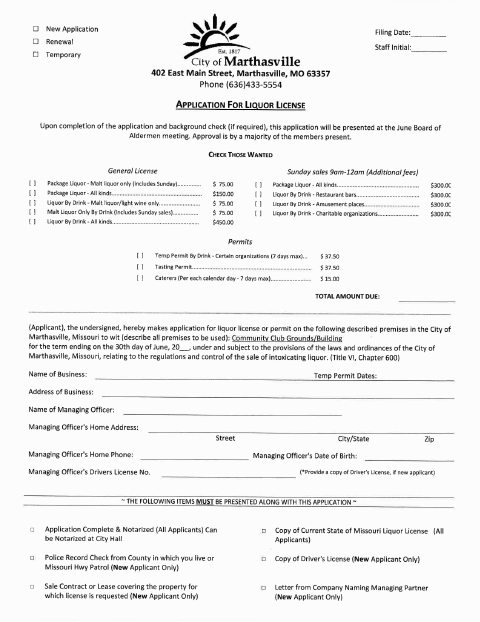
Applicants use this form to request a liquor license or permit for specified premises in Marthasville, selecting the license or permit type and providing business, managing officer, and applicant information. After the application is complete and any required background check is finished, it is presented at a Board of Aldermen meeting; the form says approval requires a majority of members present. The city requires the application to be complete and notarized, with supporting items depending on the applicant.
Who needs it
A person or business seeking a Marthasville liquor license or permit must complete this application and provide the required supporting items.
Why it needs a notary
The form includes a sworn jurat stating the application facts are true; the applicant signs before the notary, and the form also provides an owner signature line.
How to get this notarized
- 1
Download The Application
Get the Marthasville liquor license application from the city.
- 2
Complete The Form
Choose the license or permit requested and fill in the applicant, business, premises, and managing officer information.
- 3
Book An Online Notary
Schedule a remote notarization with a commissioned online notary.
- 4
Sign On Video
Sign the applicant section during the online notary session and complete the sworn jurat.
- 5
Submit To The City
Include the supporting items that apply and submit the completed application to the City of Marthasville.
Preview the form
The blank PDF straight from Marthasville. Look it over, then upload your filled copy to start the notary session.

You’ll need ID and a webcam.
A licensed online notary will join you on video, verify your government-issued ID, witness your signature, and apply their seal. You’ll receive the notarized PDF by email when the session ends.
Frequently asked questions
- How do I complete and submit this application?
- Complete the application, sign it before a notary, and include the supporting items that apply to you. The form says completed applications are presented at a Board of Aldermen meeting after any required background check.
- Do I need to sign this liquor license application before a notary?
- Yes. The form says the application must be notarized and includes a sworn statement that the facts provided are true. Sign the applicant section before the notary.
- Can I sign the application with an online notary?
- Missouri authorizes remote online notarization for its own notaries under RSMo §486.1100 to §486.1205. You can sign with a commissioned online notary; confirm with the city or town if unsure.
- What supporting documents may be required?
- The form lists a current Missouri liquor license copy for all applicants. New applicants must also provide items such as a driver’s license copy, a police record check, and a sale contract or lease.
Liquor License Application in other Missouri cities
Each city publishes its own version of this form. Pick the city where you’re filing.