
Wyckoff, MT · Bergen County
Alarm Registration Form
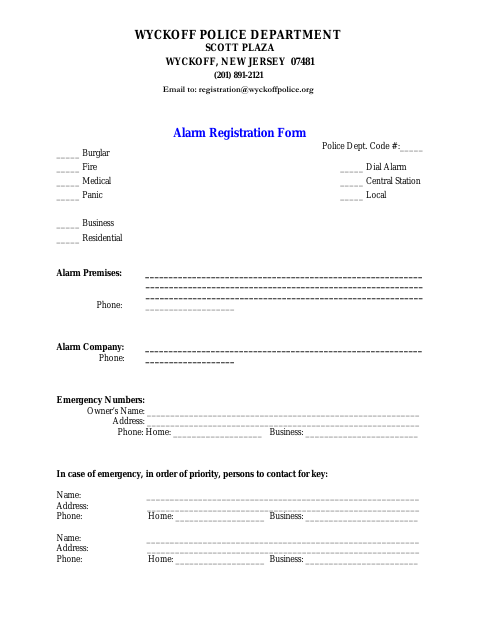
The Alarm Registration Form records alarm and contact information for people registering a residential or business alarm with the Wyckoff Police Department.
What this form is
This form records information about an alarm premise, alarm company, alarm type, and people to contact in an emergency. The applicant acknowledges receiving and understanding the cited township ordinance and authorizes the police or fire department to shut off an audible alarm sounding for more than 10 minutes. The form includes fields for the applicant’s signature and date.
Who needs it
People registering a residential or business alarm can provide the alarm premise, alarm company, alarm type, and emergency contact details on this form.
How to submit it
Email the completed form to [email protected]; the form identifies the Wyckoff Police Department at Scott Plaza, Wyckoff, New Jersey 07481.
About notarization
This form is signed and dated without a notary; it lists no attachment or related step that must be notarized or sworn.
How to submit this form
- 1
Download The Form
Download the Alarm Registration Form PDF.
- 2
Complete The Form
Enter the alarm premise, alarm company, alarm type, owner information, and emergency contacts.
- 3
Sign And Date
Sign and date the applicant section after reviewing the acknowledgment on the form.
- 4
Email The Form
Email the completed form to [email protected].
Frequently asked questions
- What information does the Alarm Registration Form request?
- It asks for the alarm premise, phone number, alarm company, alarm type, owner details, and emergency contacts who can be reached for a key.
- Do I need a notary for the Alarm Registration Form?
- No. The form includes an applicant signature and date field but no notary block or notarized attachment.
- How do I submit the Alarm Registration Form?
- Email the completed form to [email protected], as directed on the form.
Need something notarized?
This Alarm Registration Form doesn’t need a notary — but if you have another Wyckoff form that does, a commissioned online notary can help.